

Teaching a hard subject on your website, like a licensing exam? Texas Electrician Exam gives a student practice questions, labs and calculators, each with its own place in the menu, plus links back to the topic being studied. Want a working tool like that on your site? Book a free strategy call and tell us which question the tool should answer.
We’re judging what’s on screen here, and we make no claim about pass rates, sales or search traffic. We went through the live site on September 7, 2026 and tried the public box fill lab ourselves, adding an example conductor with the button, because a lab has to be used before you can judge it. The examples below are what we saw on screen that day.
Practice is a clear starting point
The homepage makes the practice experience easy to find. It explains the free starting point and identifies the optional paid question bank. A visitor can see the product structure before choosing a route.
The surrounding content connects practice to the subjects and calculations a learner may need to revisit. Instead of treating every article as an isolated destination, the site gives a reader paths into topic explanations, a diagnostic, timed exercises, and worked calculation practice.
The look stays quiet on purpose, with compact menus, plenty of space, clear labels and little color. Someone studying for a licensing exam needs their attention on the material, and plain styling keeps it there.
Hands on labs make a rule visible
The labs include conduit bending, switch wiring, box fill, and grounding electrode planning. Each uses an interaction that relates to the topic itself. These are useful examples of custom website functionality: the interface gives the visitor something meaningful to manipulate.
In the box fill lab, a visitor chooses a box and adds items from a tray. The page also provides buttons that add the same items without dragging. During our inspection, using the conductor button updated the item count, required volume, remaining room, and explanatory status message.
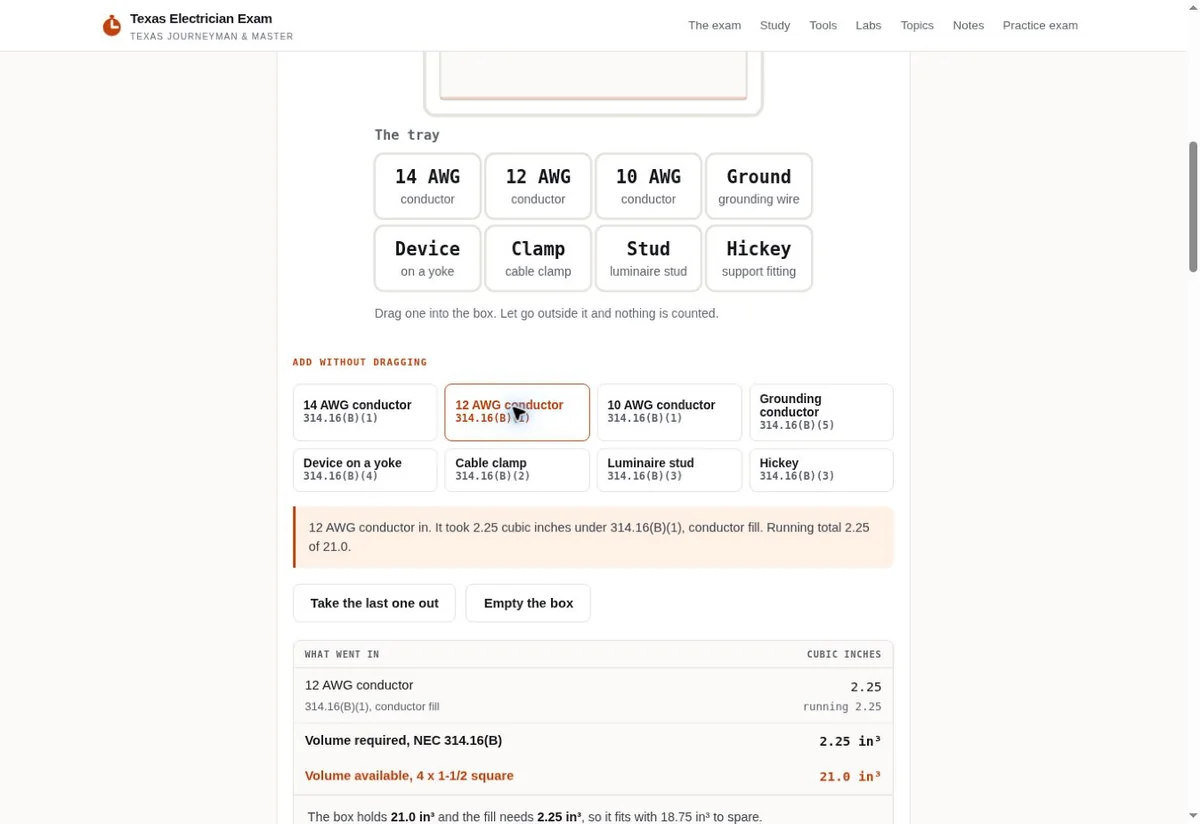
The feedback explains which item was added and names the rule associated with its allowance. A table records the running calculation. The page also explains its limits and links to the more detailed calculator for cases outside the lab’s scope.
This is the part we’d point a client to. A student can drag items or use the buttons, read why the count changed, and open the full calculator when the lab runs out.
A calculator directory organized around specific tasks
The calculator menu includes voltage drop, conduit fill, box fill, wire size, ampacity, motors, transformers, and Ohm’s law. Each label names the calculation rather than hiding it behind a vague “resources” link.
That gives people a way in from search. Someone who only wants a voltage drop answer can use that calculator, then follow a link to the topic or to practice. A learner starting with a topic can travel in the opposite direction and test an example.
The calculator directory and hands on lab directory remain separate. That distinction respects the difference between solving a specific input problem and exploring a concept through interaction.
Tool pages connect action with explanation
- Offer
- Explain what the customer can get.
- Evidence
- Support the offer.
- Action
- Make the next step easy to use.
The lab we inspected includes an introduction, controls, results, a method explanation, scope notes, and related links. The format answers more than “what is the number?” It helps the visitor understand what was entered, what changed, and what the tool does not cover.
The same layout works for a quote builder or a product selector on a business site. Pick a tool that helps a customer make a real decision.
If you’re thinking about a tool for your own site, that’s where we’d start: with something your business knows well enough to walk a customer through. We build and run more than 1,400 live websites, for clients and for ourselves, and that’s where this advice comes from.
Our own free toolkit works the same way. The Search Opportunity Finder, for example, works with supplied data and explains its assumptions so the result can support a sensible next action.
Explore the working resource
- Open Texas Electrician Exam
- Explore the hands on labs
- Try the box fill lab
- Browse the calculators
- Open the voltage drop calculator
The screenshots document the live interface reviewed on September 7, 2026. If you want a tool like this for your own customers, bring us the problem you want the tool to solve. Jeff Clerisier works out the scope with you directly, starting from the question your customers ask most. You can also look at our website design work first.

