

Someone working toward a Texas electrical license needs to know when their logged hours will let them sit for the exam. This site’s homepage points straight to an hours calculator for that, then links to the licensing pages behind it. If your customers bring one hard question to your site, Trojan Digital Marketing can plan a page around it, starting with a free strategy call.
This is a design and functionality showcase. We inspected the visible pages and the calculator interface, and we focused on the calculator because it’s where the site turns reading into a plan. The case study does not make a claim about application approval, exam outcomes, customer results, or the legal accuracy of a user’s individual situation.
An editorial design for a complicated topic
- Offer
- Explain what the customer can get.
- Evidence
- Support the offer.
- Action
- Make the next step easy to use.
The site uses a restrained, readable layout with strong headings, clear spacing, and a small set of navigation choices. Licensing, the path toward eligibility, applying, answers, and topic browsing are treated as different tasks. A visitor who knows what they need can go straight there; someone still learning the process can follow the broader path.
The opening explains what the site helps a reader work out. It then makes two actions prominent: use the hours calculator or check application readiness. That gives the homepage a practical job before the reader reaches the longer explanation.
Source references sit close to the requirements they describe. We like this a lot, because a reader can see where each requirement comes from right next to it. The site also links to a corrections page, making the maintenance of the information part of the visible experience.
The hours calculator turns reading into planning
The calculator asks for the license being pursued, hours already logged, expected weekly hours, and the date those future hours begin. Additional fields address classroom hours and an approved program scenario. The result separates the date associated with exam eligibility from the date associated with holding the license, rather than compressing both into one unexplained milestone.
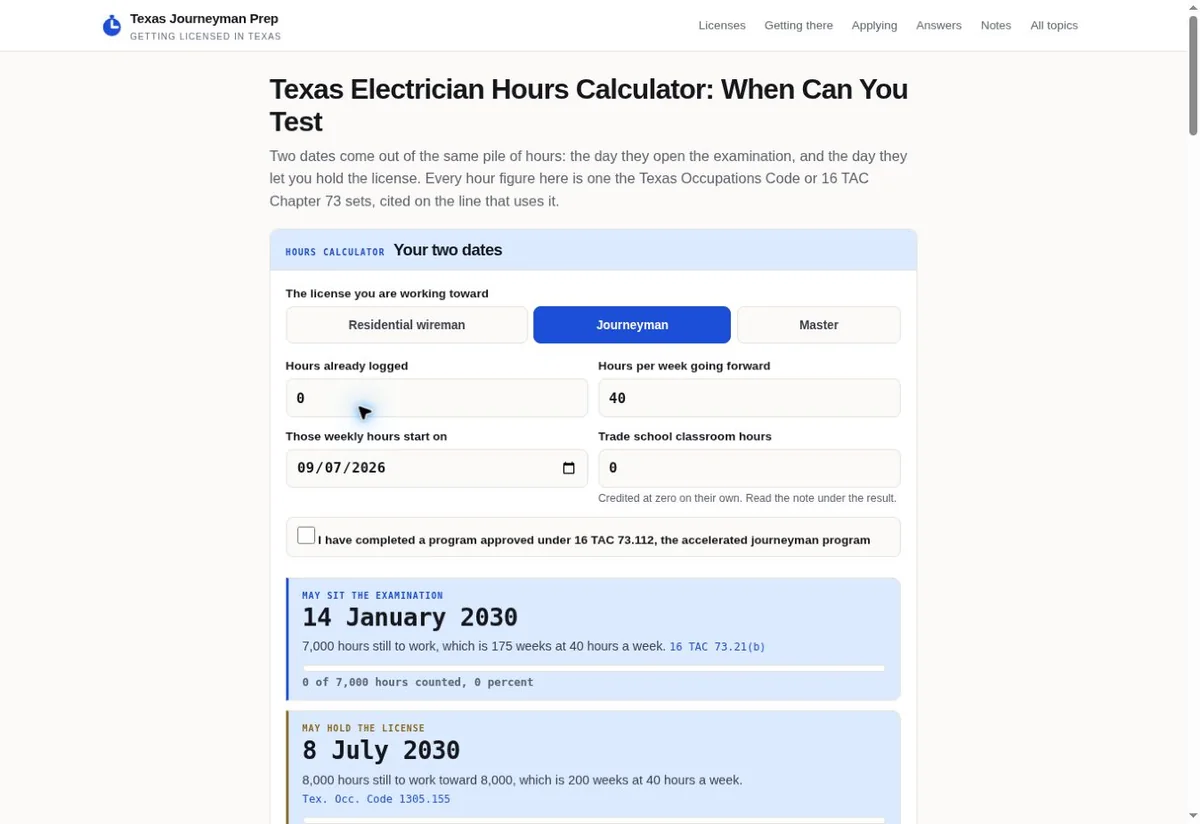
Below the result, a calculation table shows the inputs and steps. That makes the output inspectable. The user can connect the result to the hours entered and the method presented on the page. The interface also offers controls for saving numbers, clearing the scenario, and printing the summary.
The visitor gets the inputs, the dates and the reasoning on one screen. For the site, the calculator gives people something to do with the information besides read it.
Related tools form a useful next step sequence
The site connects timing with application readiness, then provides a route to the related electrician exam resource. Timing and readiness are related questions with different answers, so each gets its own page and the visitor picks the one they need.
The readiness area explains its free starting point and the paid portion before asking someone to proceed. The design makes the boundary part of the decision, which is useful whenever an educational or planning resource includes a paid product.
If your site gives some help away and charges for the rest, this is the part we’d copy first. Say what’s free and what’s paid before you ask anyone to go further, so the paid step never comes as a surprise.
A website can apply the same principle to many services: provide a helpful first answer, show what the deeper tool contains, and explain the next step in concrete language. The visitor should understand what they can do now and what requires a separate commitment.
Long form content stays navigable
- Service A
- Planned coverage: fit and next step.
- Service B
- Planned coverage: proof and next step.
- Service C
- Planned coverage: fit and proof.
The homepage includes concise descriptions of the major licensing topics and links directly to detailed pages. Readers are not expected to memorize the whole subject. They can move between a specific answer and the broader process.
Topic pages, answers, notes, and corrections give different kinds of information a predictable home. When a rule changes, the site can update one topic page without reworking the main menu.
We wouldn’t build a calculator like this on its own. Its answer only means something next to clear labels, cited sources and the pages that explain the result.
Try the actual tools
The screenshots show the live design reviewed on September 7, 2026. For your own website, we can help plan a comparable combination of clear information architecture, useful business workflows, and a focused conversion path. Tell us which question your customers need help answering. Jeff Clerisier talks the scope through with you himself before any work starts.

