Need help?Jamie

Trade website design

Westfield Roofer Website Design: Clear Services and Project Photos

A homeowner with a roof problem needs to see quickly what a roofer offers, where, and how to ask for an inspection. This case study from Trojan Digital Marketing shows how the Westfield Roofer website answers that on its homepage. Want the same for your trade? Jeff Clerisier, our founder, sets the scope with you. The first strategy call is free, and during business hours we aim to reply within five minutes.

Discuss your project
Westfield Roofer Website Design: Clear Services and Project Photos
Westfield Roofer homepage

Explore the composition, then select a detail to look closer.

The Westfield Roofer site is powered by Indy Roof & Restoration. The homepage names the roofing service and the town, then offers a way to call or request an inspection. Service pages, a process section and project photos sit behind that for homeowners who want to read first.

Its project section is a useful part of that story. The homepage reviewed on September 8, 2026 presents five labeled before and after project comparisons. They show how the site organizes the contractor’s project imagery. They are not before and after screenshots of a website redesign, and they do not establish a change in search rankings or lead volume.

We’re an Indianapolis agency, and Westfield is in Hamilton County, north of the city. The site is aimed at homeowners in Westfield, and the homepage names the town right next to the roofing service, so someone there can see straight away that the page is about their town. We captured that homepage on September 7, 2026, without the popup, for the screenshot below.

The opening makes the service and next step clear

The homepage identifies Westfield roofing services and offers routes to call or request an inspection. The navigation distinguishes inspections, repair, emergency repair, replacement, and supporting content. A homeowner can start with the service they recognize instead of interpreting a general agency style slogan.

Actual Westfield Roofing homepage capture with a blue service hero, visible call and inquiry controls, and navigation
The actual Westfield Roofing homepage, captured September 7, 2026 without the popup. The case discusses the interface; credentials and promotional statements within the capture are not independently verified here.

The visual hierarchy puts the service headline ahead of the supporting explanation. Blue establishes the main field and action treatment, while the opening photograph keeps the page connected to a trade business. On any trade homepage, we’d check first that the service, the town and a way to call all show before any scrolling.

A local service site needs room for different levels of readiness. One person wants to contact the office immediately. Another needs to understand what an inspection involves. Keeping both routes visible supports those choices without requiring everyone to read the page in order.

Five project comparisons add something concrete to inspect

The project module presents paired images under before and after labels. Its value as website content is the comparison itself: the visitor has something specific to examine alongside the service explanation. The website labels these as recent roofing projects; this review does not independently verify each project’s location, date, or scope.

Two photos alone don’t tell a homeowner much. On any roofer’s project gallery, we’d add a short caption saying what the customer was worried about, what work was done and what each photo shows. Shoot the before and after from the same angle. Leave out a customer’s name or address unless they’ve said yes.

We keep one line clear on purpose. The images show the contractor’s roofing projects. They aren’t before and after shots of our website work. We do not turn those pairs into a claim about more calls, higher rankings, workmanship quality, or insurance outcomes. The design evidence is that the site gives project imagery a recognizable place in the customer journey.

Inspection content explains the step before the sale

The inspection page organizes its content into signs to investigate, a process, photographs, scope information, questions, and an inquiry route. The sequence lets someone understand the type of service before requesting it. That is a different task from persuading a visitor to select a replacement product immediately.

Our advice to any trade business is to explain the first step before asking anyone to buy, and for this roofer that step is the inspection. Describe what the business says it does, identify information the visitor should provide, and explain how findings move into a later decision. Keep technical details tied to the customer’s question rather than using them as decoration.

On a trade site we build, this is the page where we’d have the owner check and approve every process step, credential and promise before launch. Here we describe how the page is laid out, and we don’t treat the roofer’s claims on it as checked facts.

Replacement information addresses a different decision

Make the next step usableName1Email2Send inquiry3
1. Name
Move to the name field.
2. Email
Keep keyboard focus visible.
3. Send inquiry
Complete the action without a mouse.
Make the next step usableVisible focus and a logical control order help a person navigate without a mouse. Test the complete action.

The replacement page presents a sequence involving assessment, material choice, preparation, installation, and completion. It also organizes information about scope, cost factors, and common questions. These blocks provide places for a homeowner to examine the decision beyond the first inquiry.

In our view, giving replacement its own page is the right call. The inspection page can stick to what shape the roof is in, and the replacement page can walk through a bigger project. A homeowner moving between the two shouldn’t read the same intro twice under a new heading.

The case does not validate the roof system claims or estimates appearing on the client’s website. The observed design pattern is the division of a complex service into understandable topics and a visible route back to contact.

The inquiry form can carry useful context

The contact journey presents a form and direct contact information. The service pages also place inquiry controls near relevant content. Asking for contact details, property location, and the type of help requested gives the office a starting point for the conversation.

We’d only ask for what the office will use. The first request doesn’t have to produce an estimate. It just has to reach the right person, say what the homeowner is worried about and give the office enough to explain what happens next. The service described by the page and the service choices in the form should agree.

We looked at the form the way a homeowner sees it and didn’t send a test inquiry, which means we can’t vouch for where a request ends up. We build and run more than 1,400 live websites, for clients and for ourselves, and that’s how we know a form can look finished and still never reach the office. For a new implementation, the final check should include successful delivery, usable confirmation language, mobile input behavior, and ownership of the follow up process. We’d treat a form that hasn’t passed a real test inquiry as unfinished, however good the button looks.

Why project evidence belongs in SEO and AEO work

Original project information can give a page something useful to explain. Instead of repeating general roofing statements, a documented example can address a real scope question or show what a particular part of the process means. It can also help a prospective customer decide whether to ask a more specific question.

Google’s helpful content guidance encourages original information, clear evidence, and substantial value for the intended audience. That supports the editorial choice to develop factual project stories. It does not establish that adding five comparisons caused this website to rank higher.

Google’s image guidance also emphasizes relevant surrounding text, descriptive image information, and an accessible image experience. For a project gallery, accurate captions and useful context belong alongside the photographs. Image markup should describe the visible evidence rather than add unsupported job details.

Connect the evidence to a customer question

Start with the decisionYour serviceFitTrustNext stepScopeEvidenceContact
Fit
Explain the service scope.
Trust
Show supporting evidence.
Next step
Give a clear contact route.
Start with the decisionOne service can lead to different questions about fit, evidence and the next step.
Visitor needs to understandUseful content response
Which service fits the concern?
Separate inspection, repair, and replacement information with relevant links
What kind of work can I look at?
Clearly labeled project photographs with factual descriptions
What happens after I ask?
A practical process explanation and a request form aligned with it
Who am I contacting?
Consistent business identity and direct contact information

The next useful content investment would be a verified story for each appropriate project: the original concern, approved photographs, confirmed scope, and a clear explanation of the result shown. Those facts would make the portfolio more specific. They would still need performance data before supporting a claim about SEO or sales impact.

Questions about the Westfield Roofer website case

Are the five comparisons a website redesign before and after?

No. The live homepage presents them as contractor project comparisons. The website capture in this case study documents the interface separately. Neither should be labeled as a measured website performance comparison.

Do project photographs automatically improve rankings?

No. Accurate original imagery can make content more useful and specific, but this case has no dataset showing that a gallery caused a ranking change. Search results depend on many factors.

Did this review test inspection form delivery?

No. It reviewed the publicly visible form, content, and contact paths without submitting an inquiry. A working delivery and follow up test would be a separate implementation check.

What can another trade business learn from this design?

Give each service a clear role, show relevant evidence, explain the first step, and collect the information your team needs to respond. Build the journey around your own business rather than copying unverified credentials or service promises.

Make your own work easier to understand

Explore our roofing marketing services, home services marketing, and website design approach. If your project photographs and service information are disconnected, tell us how your customers choose a contractor. We can discuss a clearer structure for the evidence you already have. Jeff works out the scope with you directly.
Sources & further reading

Want work like this for your business?

The first strategy call is free, and during business hours we aim to reply within five minutes.

Separate the archived screen from facts the owner must verify

This case supports a look at visible design choices. A buyer can use those notes to plan checks for another website, while leaving unverified business and performance claims open.

Observed site detail and proposed acceptance check
Detail to inspectEvidence available in this caseSeparate check for a new assignment
Opening contact choicesThe archived page displays contact controls alongside its trade identity.Inspect the chosen route on the new site and confirm the business receives a marked request.
Project captionThe case describes a labeled contractor project gallery.Ask the owner to support the details behind each caption before publication.
Related service routeThe case discusses separate service explanations.Check the planned project link against the service the new business actually offers.
Inquiry labelThe public case describes a visible inquiry journey.Compare the question asked with the details stored by the receiving office.

The screenshot is a record of an earlier public layout. Its visible controls and headings can be examined without treating every sentence inside it as a supported fact. Our check uses that boundary throughout this guide. It matters when a contractor's promotion contains a credential, a service commitment or an implied result that the image alone cannot support.

The homepage image was captured on September 7, 2026, and the case's project account describes a review the next day. Those dates put the shown layout in context. A contractor can use that saved view to discuss design choices. Current behavior still needs a separate inspection of the live site under agreed access.

What should a buyer treat as demonstrated here?
Treat the described screen arrangement as documented design details. Our check can point to how the case organizes a service explanation and an inquiry choice. It doesn't supply a dataset about customer behavior. A buyer interested in a similar task should ask what its own finished website will need to show and which behavior still requires a separate test.
Does the archive stand in for a present live check?
The archive has a defined date and scope. Use the saved material to discuss the visible layout it records. A new website task needs checks suited to its current version and purpose. We would inspect that site under agreed access. An older capture can inform the design conversation without serving as a recent working test.

Give each project image a caption that can stand on its own facts

The contractor gallery gives viewers a labeled place to examine work images. For a new site, each caption should describe supported project details without expanding the photograph into an outcome claim.

Westfield Roofer homepage and contact choices
Project label: Westfield screen shows visible contact routes. View the project
  1. Identify the source material Ask who supplied the project pictures and which set belongs together. Our planned content check would keep that source attached to the draft caption. Similar-looking files can still depict different jobs. A neat gallery layout can't support that two photographs form a genuine comparison or that the contractor may publish them.
  2. Write the visible description Describe what the owner can support about the images. We would ask for an approved account of the pictured work when it is needed to explain the pair. Avoid guessing a roofing material or work stage from a small screen capture. A caption should help a viewer understand the facts the business actually possesses.
  3. Mark details awaiting the owner If a location or project date is needed but unsupported, leave it for the owner to answer before publication. We can propose a check field for that question. The designer shouldn't add a plausible town merely because it matches the service area. A local gallery needs accurate project context as well as a recognizable place name.
  4. Read the claim beside the image Check whether the surrounding copy says more than the approved caption supports. Our check would flag an added quality or sales statement as its own claim. The presence of a work photograph doesn't support a customer endorsement, an insurance result or the number of inquiries a website generated.
Can the gallery prove a website redesign?
The public case treats these as comparisons of contractor work. We should retain that role when discussing the design. They aren't a measured pair of old and new website states. A claim about a website redesign would need the related website records; a claim about performance would require still more facts about the measurement.
What does the Westfield capture contribute to this chapter?
It illustrates how a trade website gives visitors a first contact choice within its opening layout. Our photo placement does not reproduce the full project gallery or verify its individual jobs. Use it as a visual reference to the case's public layout. The caption check described here is planned work for another site, with its own material and approvals.
Should every photograph carry a town name?
Only use a location when the business can support it and has approved its publication. Our planned check asks what the place adds to the visitor's question. An accurate local detail can help explain the work. A town added solely to make an image sound local can turn a truthful photograph into a misleading caption.

A caption can remain useful while being modest about its scope. It might explain the part of the project the image shows and direct the viewer to a fuller account. We would prefer that specific description to an unsupported endorsement. The useful design decision is to make the caption easy to connect with its image, rather than hiding necessary context in a distant paragraph.

Keep photographed promotion from becoming our own assertion

Text inside a contractor screenshot remains that site's statement. This case does not check pictured credentials, service promises or technical claims merely by displaying the screen.

Can a badge in the screenshot prove a credential?
It shows that the pictured page displayed the badge. Our case doesn't check the credential or its scope. A new contractor site needs facts from the business before publishing a comparable statement. Copying the badge treatment from this reference would not create a right to use the same mark or claim the same status.
What about a stated inspection or response commitment?
The contractor must confirm which commitment its team can make. We can check how a new page presents an approved statement, but the archived promotion doesn't set another business's schedule. Keep design notes limited to placement and clarity. A prominent action may be visually identifiable even when its operating promise needs separate verification.
Do the work pictures validate the roof advice?
A picture can contribute to an approved project explanation. It doesn't support every technical assertion nearby. We would ask the contractor to check the service content it intends to publish and supply the facts behind it. This case's design discussion shouldn't become a roofing recommendation, a workmanship evaluation or a statement about an insurance decision.
How should the case handle a customer result?
Use a result only with records that support the particular statement and permission where needed. Our case has no measured acquisition result to add. A work image might show an approved visible change, but it doesn't show how many calls followed. Any performance claim needs its own definition, period and facts rather than an inference from the layout.

This boundary affects proposal comparisons. One agency may show a polished contractor screen with strong promotional language; another may show a quieter screen. The strength of the promotion alone doesn't support that one agency produced a better business result. We suggest comparing the actual website task, the supported content and the checks included in each planned scope.

For a Westfield-focused contractor, local wording should identify the offer the business truly provides. Our Indianapolis location doesn't prove contractor coverage or a local project relationship for another buyer. Our design conversation should begin with that buyer's own service facts. A town mentioned in this case is context for the example, rather than permission to invent a similar local history.

Use labeled planning fields to define a planned form check

A separate planning interface can illustrate how field names clarify a task. For a contractor inquiry, the check method must inspect its own labels, saved values and customer feedback.

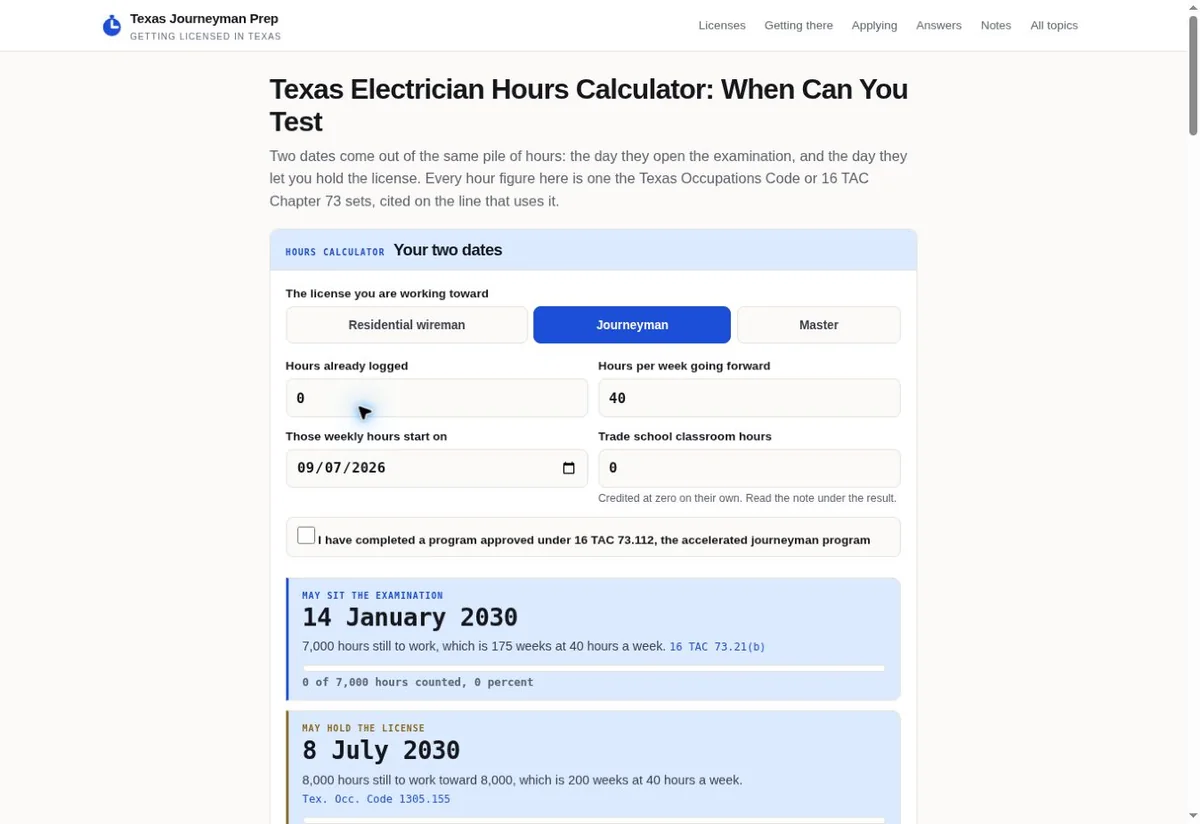
Texas Journeyman Prep calculator with labeled fields
Inquiry method: Texas calculator presents labeled planning inputs. View the project
  1. Name the task each field serves Ask the receiving office why it needs each planned input. We can then inspect whether the visible label describes those details in plain words. The Texas Journeyman Prep capture shows labeled planning inputs in another context. It supplies a real interface reference, without proving that a contractor inquiry was built or tested.
  2. Enter clearly marked sample data Agree a permitted test and use data the team can distinguish from a real request. Our planned method would include an uncertain answer if the form is meant to support one. Keep the test narrow enough to evaluate the stated behavior. A fictional sample should never be described later as a genuine roofing opportunity.
  3. Compare both sides of the submission Inspect the customer's entered question beside the receiving record. We would check whether the field names and saved values remain understandable together. A staff notice can arrive while losing the context that made a selection useful. A successful send message is one note; a usable office record is another.
  4. Review the customer feedback Read the success or error message in the tested state. We should be able to explain what happened and what the user can do next. That message must match the business's real process. If the office still needs to arrange a conversation, the website shouldn't describe the sample as an accepted service appointment.
What can the calculator photo prove?
It shows the captured planning interface and its visible field arrangement. Our discussion uses that image to make the labeling task concrete. It proves no contractor form receipt, calculation accuracy or accessibility status. The new site's check needs its own controls and receiving path; a related design photograph cannot supply those test results.
Is every form check a full accessibility check?
A label check is a bounded part of the work. We can identify the question it answers without treating it as a complete evaluation. Other behavior needs agreed checks in the actual interface. Describe the work and findings at their real scope, so a buyer can tell which questions were addressed and which remain open.

This method is planned, rather than a record of work performed on the historical Westfield site. The existing case describes the form as publicly displayed. We didn't submit a contractor inquiry for this guide. Our comparison explains what a new buyer could ask to have checked during an authorized website assignment.

Distinguish a screen check from a working behavior check

A saved image lets a buyer examine layout. Working links, input states and receipt behavior need direct inspection of the actual site, with the limits of each check recorded.

Hypothetical example A planned contractor gallery check has a project date awaiting owner clarification

Before

  • In this illustrative check, a draft project caption includes a date the owner has not supported. The person checking the page sees a tidy image pair and leaves the date as written. A later proposal calls the gallery fully checked, even though the check covered only the visible layout. This scenario describes an invented check gap, not a fault found on Westfield's site.
  • The same planned report labels a contact route tested because its button appears in the screenshot. No permitted interaction or submission was performed in the scenario. We would flag that wording as a mismatch between the claim and the check method. The draft could look complete while its factual and behavioral questions remain open.

After

  • A revised check note lists the project date as awaiting the owner's answer. It records the image arrangement as inspected while leaving behavior for a separate authorized check. We can use those distinctions to compare the planned deliverables. The owner can see which fact is missing instead of receiving a broad finished label.
  • Once the owner supplies a supported date, the caption can be updated under the actual content check. A separate permitted contact check can address the chosen route. Our example claims neither event occurred. Its purpose is to show how a precise report keeps a factual correction from being mistaken for a form test.
  • Name the screen or page version that was inspected. We suggest retaining enough context to distinguish an earlier capture from a later live site.
  • State the action actually taken. Reading visible copy and following a link are different checks, even when they concern the same page.
  • Record what the note supports. A visible confirmation message alone shouldn't become a claim about a staff member's follow-up.
  • Leave unperformed checks explicit. Our planned report should let the owner identify the remaining question without reconstructing the check from memory.
How does this help a contractor compare agency proposals?
It turns a general check promise into specific questions about facts and behavior. We suggest asking each agency which checks its scope includes and which records it will let the owner inspect. Two similar screenshots may come with different delivery work. The buyer needs that distinction before judging the proposals by appearance alone.
Can an image show a page is fast or usable on every device?
It doesn't measure loading or show every device state. We can discuss a separate performance or usability check when that belongs in the scope. The report should identify its method and conditions. This case's saved image remains a visual record; it doesn't supply a loading measurement or a universal usability conclusion.

Make the next correction identifiable without inventing a project history

A planned correction log can connect a content question with its owner and later check. Keep that future process separate from the historical work this case does not document.

Planned contractor website correction record
Draft questionWho needs to supply the answerWhat a later check could inspect
Project date awaiting supportThe business contact responsible for project records.The corrected caption and the facts used to approve that detail.
Service destination seems unclearThe owner of the actual service offer.Whether the revised link wording agrees with the destination topic.
Inquiry wording implies acceptanceThe team responsible for handling incoming requests.The tested receipt message and the receiving record under the agreed process.
Pictured promotion awaits factual supportThe business responsible for the claim.An approved factual statement or the removal of the unsupported wording.

A correction needs enough context for another person to find the same issue. Our planned note would identify the affected page and the question that remains open. A short description is often more useful than a broad request to improve trust. The next person needs to know whether they are checking an image detail, a service statement or a tested interface state.

The owner may decide that a disputed detail is unnecessary to the page. Removing it can be a valid content decision when the remaining account still helps the visitor. We shouldn't replace it with a more persuasive unsupported claim. Record what was changed so a later editor doesn't restore the old detail simply because it appears in an archived screenshot.

Who approves the factual correction?
The business should identify the person responsible for those details. Our website role can include presenting the approved wording and checking its placement. It doesn't create the project facts. A person who edits the screen may still need an answer from the contractor before a date, credential or service promise is ready to publish.
What happens if the answer is still missing?
Keep the claim pending or use an approved narrower account. We suggest making that choice explicit in the check record. The unresolved question may affect whether a project example can be published at all. A report should not declare the content verified merely because the designer has finished arranging its photographs.
Does this log describe work Trojan Digital Marketing performed on Westfield?
It is a planned method for a new assignment. We haven't reconstructed a historical edit log or claimed these corrections occurred on the contractor's site. The case's existing materials support a dated public layout. This chapter helps a buyer ask for clear correction records without inventing a delivery history behind that layout.

Bring your own facts to a proposal for comparable trade website work

A new contractor can use this case to identify useful website questions. The scope should start with its own service facts, approved project material and a receiving process the team actually uses.

  1. Show a supported project account Bring material you have permission to share and explain which visible details you can support. We can discuss how that account might connect to a related service question. A reference screen can help explain your preferred layout. Your own project facts determine the claims your site can make.
  2. Identify one unclear customer decision Tell us where people struggle to understand the next step on your current site. We suggest choosing a concrete question the website can address. It could concern the service linked from a project image or the meaning of a form choice. That task gives the planned work a clearer purpose than a general request for a stronger impression.
  3. Describe the office record you need Show an anonymized example or explain which details staff use after contact. We can discuss the relationship between the website question and that receiving record. The office's actual process sets the required details. A reference site's form doesn't support the right fields for your team.
  4. Compare the planned checks Ask which facts need your approval and which behaviors the assignment will inspect. We can define those website tasks in the scope conversation. Leave unsupported outcome predictions out of the comparison. A useful proposal gives you work to evaluate against your actual details and process.
Can a contractor use this layout as a ready-made service promise?
The reference can help explain a visual preference. It doesn't provide another business's approved copy, project history or operating commitments. We would start with the facts your company can support. Similar layout may suit a different service process, so the inquiry wording and related content need their own check.
What is a reasonable final check question for this work?
Ask whether the agreed page presents the approved material and whether the permitted interface check supports the stated behavior. We can discuss how you will inspect those records. The answer concerns the website deliverable. It doesn't prove future demand, a ranking result or a contractor's successful sale.
How can we begin with Trojan Digital Marketing?
Bring the site you want to improve and a specific gap in how it presents your work or receives a question. We can discuss that assignment from Indianapolis, Indiana. This case offers concrete design reference material for that conversation. Your business supplies its actual service boundaries and the facts behind any project claim.

The most useful comparison is between your intended task and the work planned to complete it. A Westfield screen can make that discussion tangible, but it can't answer your company's factual or operational questions. Our role is to help connect approved material with a clear website path. The check record should show what was checked and leave any remaining question visible.

Sources

From the businesses we've worked with

“Oh my gosh! This is perfect! Thank you! You can always count on Trojan Digital Marketing!”
J. HollandSho.Lux Lifestyle Centre