

On Jerry Super’s Shorts, we handle the editing, pacing, captions and optimization. The creative work centered on his characters, humor, and recognizable comic situations.
What we do:
Trim and structure each Short so the pacing is clear and the setup stays whole
Set captions and thumbnails so they read on a phone
Time releases to fit the channel’s posting schedule
Check with Jerry so each edit matches his voice and humor
Creative focus
Portrait framing and captions for short form viewing
Consistent character presentation across the channel
Titles, thumbnails, and editing shaped around each comic setup
Keep the creator’s personality at the center of the edit
Jerry Super’s channel is built around character, expression, and recognizable comic situations. We edit the Shorts and set the captions and thumbnails, and we check with Jerry so it all sounds like him. Every choice has to serve his performance, since that’s why people watch.
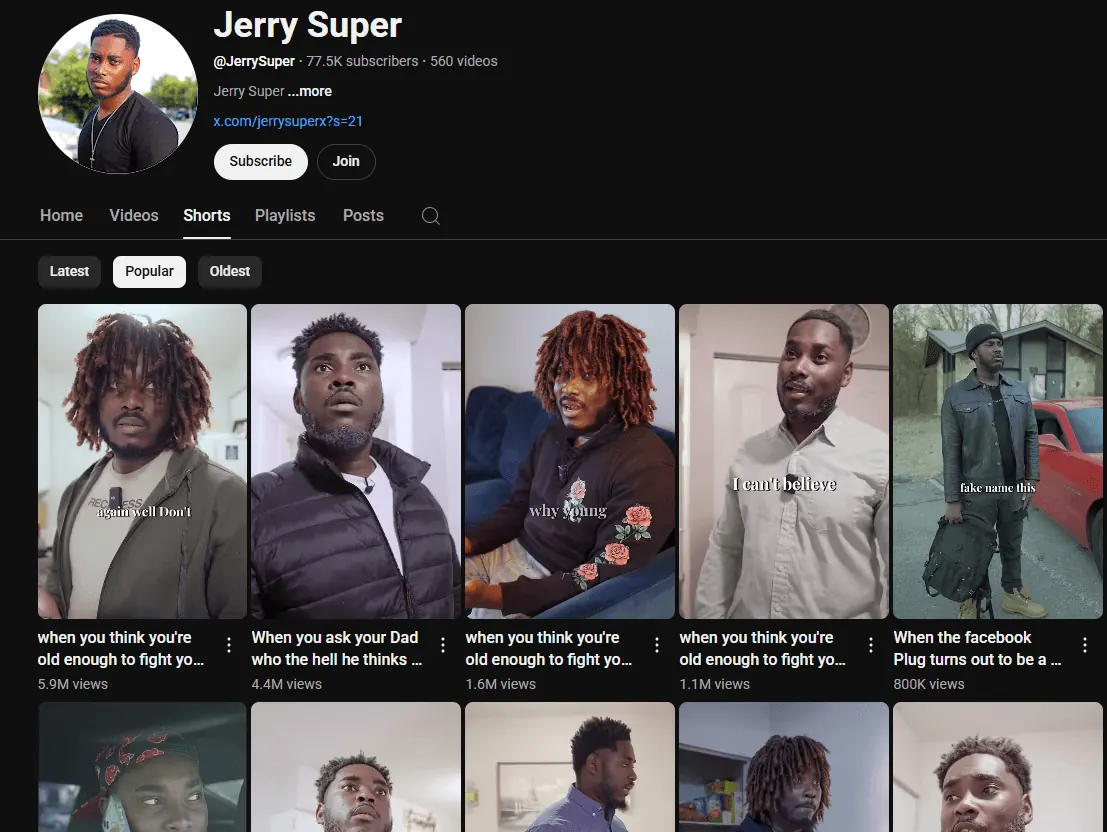
The channel image gives a useful view of the resulting presentation. Portrait frames keep attention on people and their reactions. Several previews show the performer from the chest or waist upward, allowing facial expression and body language to carry the scene. Short captions sit inside the video image, while the titles beneath introduce the situation.
What stands out in the channel presentation
| Visible choice | What it communicates |
|---|---|
| Portrait video frames | Gives each character and expression a large share of the available image. |
| Different costumes and settings | Helps distinguish characters and situations within a recognizable channel identity. |
| Brief white captions over the scene | Brings selected dialogue into the visual presentation. |
| Titles beginning with familiar situations | Introduces the premise before a viewer opens the video. |
The edit has to preserve the joke
When we trim one of Jerry’s Shorts, we keep the whole setup, because his reaction only works if you saw what led up to it. A cut that makes a clip shorter can also remove the detail that gives the next moment its meaning. So we pace each scene on its own instead of forcing one cut length across the whole channel.
That’s why matching Jerry’s humor matters so much on this channel. His expressions, his delivery and his switches between characters are the material. The cut should make them easy to follow and give a viewer a moment to catch each expression before the next beat.
Treat captions, previews, and titles as one package
- Observe → review
- Check the page and its evidence.
- Update → recheck
- Publish the change and check the result.
Jerry’s titles usually name a family or personal situation people know. The preview picture shows a face or character that fits it. So before anyone opens the clip, they already expect a certain setup, and the first seconds have to play out that same setup.
Where a caption sits matters as much as what it says. If it covers Jerry’s face or what he’s doing, it hides the reason people watch. In the clips shown here, the captions are short and leave the performer in view.
Questions to ask before approving a short form edit
- Can someone understand the setup quickly? Remove confusion before adding extra effects.
- Does the pacing preserve the performance? Review the setup and reaction together.
- Do the preview and title match the clip? Set an expectation that matches the video.
- Are captions readable without hiding the action? Review the finished frame at phone size.
On Jerry’s channel, every edit starts from his personality. If you’re planning a video series for your business or your own channel, start by telling us who you want watching and what footage you already have. On a free strategy call, Jeff Clerisier, our founder, sets the scope with you before any editing starts. Talk with us about editing your videos.
