Need help?Jamie

Market service plans

Avon Website Design for Appointments and Store Visits

You run an Avon studio or shop, and people keep phoning to ask your hours or how to book because your site hides both on a phone.

Trojan Digital Marketing designs websites for appointment businesses and shops in Avon, Indiana, built around the one task a visitor came to finish, whether that's booking a time or checking before a trip. It's for owners who hear, 'I couldn't find how to book, so I just called.' If you'll sell products online too, Indiana's 7% sales tax setup comes first.

Tell us how bookings reach you today and send your current site link. The first strategy call is free, and during business hours we aim to reply within five minutes.

  • Booking or requests, matched to how you schedule
  • Hours and visit details first on a phone
  • Online sales only once the tax setup is done

Jeff Clerisier has designed websites since 2016 and still runs Trojan, so an Avon studio or shop site gets planned by an owner-run team. Planning starts with the pages your customers open most, like opening hours and booking, before any layout gets drawn.

Illustrative creative production workspace.
IllustrationThis page drawn as a wireframeThe headline, highlights and button from this page, redrawn in desktop and phone layouts. It’s an illustration of page structure and isn’t a client site.PAGE WIREFRAMEtrojandigitalmarketing.com/avon-website…Avon Website Designfor Appointments andStore VisitsBooking or requests, matched to how you…Hours and visit details first on a phoneOnline sales only once the tax setup is…Book a free strategy call010203Avon WebsiteDesign forAppointmentsand Store…Booking or…Hours and…Online sales…Book a free…

YOUR WORKING BRIEF

Choose where to start

Select the parts you want to discuss. Your choices carry into the inquiry form.

Discuss this service0 priorities selected

SEE HOW THE PIECES CONNECT

Explore the decisions
behind the plan.

THE TROJAN SYSTEMWEBSITE
A website built around the next customer decisionMESSAGE · EVIDENCE · ACTION
  1. A clear offer
  2. Evidence for the customer
  3. An action that works on mobile
A website built around the next customer decision

Questions about website design in Avon, Indiana

  • Avon economic development news documents retail and industrial projects. Plans begin with each business service mix and verified customer evidence. Town of Avon economic development

How much does a website cost for an Avon studio or shop?

The one published package is the Marketing Startup Kit at $7,997, or three monthly payments of $2,799. For that you get a custom 15-page website and Google Business Profile optimization, plus twenty blog posts and three months of consulting. Smaller redesigns get priced after the free strategy call, when the page count and your booking or request setup are clear.

How long does an Avon website project take?

The Startup Kit's published example schedule launches in about twelve weeks, and the real schedule is set after scope review. What moves it most is how quickly your photos and feedback come back during the two formal revision rounds. A smaller update to a site you already have can move faster, and its timing gets agreed on the free call.

Should our Avon site take bookings online or appointment requests?

Offer instant booking only when your calendar can truly confirm the slot without a staff check. On the booking path, the first thing we ask is who approves a new visit today. If someone on your team has to okay a first visit or a bigger job, we'd build a short request form that says when you'll reply, since a booking cancelled later frustrates people more than a request that gets a quick yes.

Can our Avon shop add online ordering to the new site?

Yes, once the state paperwork is in place. An Indiana business selling taxable goods registers as a retail merchant with the Department of Revenue through INBiz, which it needs before it can collect the state's 7% sales tax. Until then, product pages that show what you stock with a call-ahead button keep shoppers informed without a checkout.

What should an Avon store's website show before someone drives over?

Your hours and whether they need an appointment should sit where a phone shows them first, above any slideshow. People checking a shop before a trip want to know it's worth the drive, so the visit details belong near the top, and holiday hours on the site should change the same day the sign on your door does.

What if the new site doesn't bring more bookings?

Then we check the path to the form before anything else, starting with a test request sent from a phone to the inbox that should get it. We tag each booking or request with the page it started on, so you can see whether people reach the form and quit or never reach it at all. Shortening the form or moving the button higher are the first fixes we'd test, measured against the same month last year.

Avon grew by about 3,250 residents from 2020 to 2024. What should our homepage do for them?

Put what you do and how to book on the first phone screen, since a newcomer has no friend's recommendation to go on. Census estimates put Avon at 24,735 residents on July 1, 2024, up 3,253 from the April 2020 base. Your services and booking button belong above any photo slider, where a first-time visitor sees them without scrolling.

Which Avon and Indiana facts change a website build?

Website design for an Avon, Indiana studio or shop depends on whether the site will sell goods, and on a town with thousands of residents who arrived after 2020.

  • An Indiana business that sells taxable goods registers as a retail merchant with the Department of Revenue through INBiz, a step it needs before it can collect the 7% state sales tax.

    Decide early whether the site sells online or sends shoppers to the store, because checkout and tax settings add pages and testing.

    Indiana Department of Revenue, Sales Tax pageChecked September 25, 2026
  • Indiana doesn't issue one general business license. Companies file with the Secretary of State on INBiz, and anything beyond that depends on what the business does.

    The footer and policy pages can carry the registered name from that filing, while the name on your sign leads everywhere else.

    IN.gov Business Owner's Guide; INBizChecked September 25, 2026
  • Avon's population estimate climbed from 21,482 on the April 2020 base to 24,735 by July 1, 2024, and the Census file places all of those residents inside Washington Township.

    Write Avon, Hendricks County into your page titles and contact block, so a new resident who searches by town sees you're local before reading further.

    U.S. Census Bureau, vintage 2024 city, town and township population estimates for Indiana (sub-est2024_18.csv, GitHub copy)Checked September 25, 2026

The tax and registration rules are statewide and were confirmed through secondary sources because in.gov couldn't be opened during research. Check them with the Department of Revenue before any checkout goes live.

Which booking setup fits an Avon appointment business?

Website design for an Avon appointment business starts by choosing how a visitor asks for time, and the right setup depends on what your staff must check first.

SetupFits whenThe page has to sayWatch out for
Instant online booking
Any open slot can be taken without a staff check
How long each service runs and your cancellation terms
Calendars showing slots staff can't honor
Appointment request form
Someone must confirm fit, like a first visit or a large job
When you'll reply and what happens after
Form fields nobody on staff reads
Call ahead or walk in
Most visits are quick and the counter handles questions
Hours up top and a tap-to-call button
Holiday hours left stale after the day passes

What should an Avon business gather before a website build?

Trojan designs from Indianapolis, and Avon sits inside the central Indiana area it serves. A build for an Avon studio or shop moves faster when photos and service details are ready before round one.

  • Photos of your real space and work, even ones taken on a phone
  • Every service with how long it runs and any prep a customer needs
  • The booking tool or calendar you already use, if you have one
  • Your current hours and the holidays you close
  • Whether you'll sell products online or only in the store
  • A page map that gives each booking or visit task its own page
  • Mobile layouts checked on real phones before launch
  • Forms tested from the customer tap to the inbox that receives them
  • Page speed checked with your actual photos in place

Start with what a visitor needs to do

A business website should make its first useful action obvious without flattening the brand into a row of generic boxes. For an Avon appointment business, that action might be choosing a service, checking preparation requirements or requesting a suitable time. For a retailer, it might be checking whether an item is normally carried before making a trip. Trojan begins with these tasks, then develops the layout, photography and interaction around them.

The Town of Avon business updates provide a local commercial reference. They do not tell us how your customers behave. We learn that from your staff, existing website activity and the practical limitations of your booking or sales process.

Give the homepage a visual point of view

A useful homepage can have depth without demanding that every visitor read everything. We propose a clear opening offer, a distinctive photograph or approved project detail, visible service choices and a short route to the most common task. Longer explanations can sit below those choices with headings that make the page easy to scan.

Read more

For an appointment studio, a treatment room or work area can be more informative than a stock photograph of people pointing at a laptop. Captions can explain what the visitor is seeing. Subtle reveals, a service comparison interaction or an expandable preparation checklist can add character when they serve the task. Motion should respect reduced motion preferences and should never be required to find a button or understand a service.

An illustrative pet grooming booking journey

Imagine an Avon grooming studio that accepts appointment requests but confirms suitability with an employee. This example describes a possible design, not an existing Trojan client. A generic calendar could imply that any pet can be booked immediately. A better brief would explain the request process, identify relevant service categories and give staff enough information to respond responsibly.

Website momentDesign choiceOperational question
Choose a service
Show grooming options with clear scope
Which pets and services can staff accept?
Send a request
Ask for essential contact and pet details
Who checks suitability before confirmation?
Prepare for a visit
Provide approved preparation instructions
What must a customer know before arrival?

The completion screen would say that a request was received only after the form system confirms receipt. It would distinguish that step from a confirmed appointment. The wording and workflow need to agree.

Keep forms short without hiding important qualifications

Keep the outcome definitions separateRelevant visitInquiryQualified leadBooked job
Relevant visit
A person reaches the page.
Inquiry
The person contacts the business.
Qualified lead
The inquiry meets the agreed rules.
Booked job
The customer chooses to proceed.
Keep the outcome definitions separateA visit is not an inquiry, and an inquiry is not a booked job. Widths are conceptual, not reported results.

Trojan maps each form field to a staff decision. If a detail is not needed to route or assess the inquiry, we question why it is required. If a missing detail repeatedly causes an extra phone call, it may deserve a clear optional field. Field labels, error messages and keyboard behavior are part of the design scope, not final polish.

Read more

A form should retain entered information when validation fails. It should explain what happened if the connection drops and offer an appropriate alternative contact method. We test both the visitor experience and the destination inbox or customer system. A beautiful success animation has little value when the inquiry never reaches the person expected to answer it.

Plan image quality and mobile performance together

We request source photographs with enough detail for the intended display size, then prepare responsive versions. WebP conversion is useful, but dimensions, cropping and loading priority also matter. The main image should be considered separately from a gallery that appears much farther down the page. A smaller phone should not download a giant desktop photograph merely because both use the same component.

Read more

Google's Core Web Vitals guidance covers loading, responsiveness and stability. Our design review uses those categories alongside readable type, usable controls and actual form behavior. We measure a proposed build before describing its speed. A laboratory score and a real visitor experience are different observations and should be reported as such.

Make editing part of the design

A website is easier to maintain when the owner knows which fields control service descriptions, photographs, opening hours and common questions. Trojan can plan reusable editing blocks with enough flexibility for different services while keeping spacing and typography consistent. The content model should prevent an oversized upload or a missing photograph from unexpectedly breaking a layout.

Read more

The client supplies brand assets, approved service information, image rights, booking rules and the staff contact responsible for inquiries. We document who owns ongoing edits. Seasonal changes should have an identifiable place in the CMS, and outdated notices should be easy to retire. We also plan useful image alternatives so a page remains understandable when an image is unavailable.

Evaluate the design through customer tasks

Start with the decisionYour serviceFitTrustNext stepScopeEvidenceContact
Fit
Explain the service scope.
Trust
Show supporting evidence.
Next step
Give a clear contact route.
Start with the decisionOne service can lead to different questions about fit, evidence and the next step.

The review should ask concrete questions: Can a new visitor identify the right service? Can someone using a phone send a request without zooming? Can staff distinguish a new inquiry from a confirmed booking? Does a returning customer find preparation information without navigating the entire site again?

Trojan can scope a redesign around those tasks and propose the content needed to support them. Our website design service explains the broader work, while the image converter is useful for preparing owner supplied photographs. Bring an example of a confusing customer interaction to the discussion. It gives the design a real problem to solve and a practical basis for review.

Sources & further reading

YOUR NEXT MOVE

Make the next step count.

Show which appointment is being changed

An appointment-change page should identify the existing booking and the state of the new request. We ask how staff make that change before choosing the screen's wording.

A proposed record for returning appointment customers
Customer situationBusiness answer neededScreen check
Original visit is confirmedWhich details identify the accepted visit, and who can access that record?The page shows enough context for the customer to recognize the visit. We avoid exposing other bookings through a general search.
Different time is requestedDoes a staff member accept the change, or can the calendar commit it directly?The result uses wording that fits the actual process. A preferred date remains a request while staff still need to answer.
Customer asks about cancelingWhich approved terms apply to this visit, and who can explain an exception?The page explains how to ask. We don't invent a refund or fee from what another business usually charges.
Earlier message is missingWhich contact can locate the visit using details the customer can safely provide?The recovery route works without requiring a reference the person no longer has. Staff receive the context needed to find the record.

A returning customer has already done the work of choosing you. The change page should acknowledge that stage. We suggest opening with the visit they recognize and a clear explanation of what may be changed. An unrelated sales form can make them describe the original request again without helping staff locate it.

Use the same service name the customer saw when booking. If your team renamed it afterward, explain the connection. We can discuss how the page should display the earlier term without leaving an obsolete offer available for new bookings. Staff must confirm what happens to visits already accepted under that name.

Collect enough detail to find the accepted visit

A reschedule request needs information that helps staff locate one booking and assess the proposed change. We start with the details your existing booking records actually contain.

Yahweh House of Prayer public church homepage
A public church homepage provides a visible layout reference for presenting returning-visitor information. View the project
  1. Find the matching fields Ask your booking team what they use to locate a visit when someone calls. We can use those same terms on the page. A booking reference may help, but the person also needs a route when that reference is unavailable.
  2. Explain the requested date Say whether the field asks for a preferred replacement or changes the booking immediately. Our label should make that difference clear before submission. If the person can offer more than one date, ask how staff want that information presented.
  3. Keep the first visit visible If the old booking remains in place while staff check the change, confirm that rule with the business. We can display the approved explanation near the action. The interface shouldn't silently suggest the original visit has been removed.

The church homepage image paired with this section shows existing public website work. It gives us a concrete example of arranging readable information beside visitor choices. It doesn't show an Avon booking system. We use the visible layout to discuss clarity while your team supplies the fields and actual appointment rules.

A contact field may need a short instruction when the customer used a different name or number for the original visit. We ask staff which mismatch occurs in real records. The goal is to help them locate the appointment without making someone guess what the system considers their official details.

Should the customer upload the original email?
Only add an upload if the business needs it and can handle the material properly. We can discuss a simpler route first, such as entering the details staff already use. An email may contain unrelated private information. The form should explain what is needed without encouraging a full inbox screenshot.
What if two bookings look similar?
Ask staff how they resolve that ambiguity today. We can include the identifying detail they need, with an instruction that tells the visitor why. Before sending a change, let the customer check which appointment they selected. Showing a date alone may leave the wrong visit selected.

Use the business terms when explaining a cancellation

Cancellation wording should explain the actual action the customer is taking and the terms that apply. We need the business to approve both before the page can present them.

Does pressing cancel always end the booking?
That depends on the process your business has agreed. A page might send a cancellation request to staff, or a connected system might cancel directly. We ask which one applies and test the state change. The button and next message should describe the same action so the customer knows where things stand.
Can the website state that a fee will be waived?
Only when the business has approved that statement for the relevant situation. We don't borrow another studio's policy or assume staff will waive a charge. If an exception needs a conversation, the page can identify the appropriate contact. The customer should understand that the answer still needs that person's approval.
Where should the original terms appear?
Make the applicable terms easy to reach while the person considers the change. We ask whether the terms depend on the booking date or service. A current general policy may differ from the conditions under which an earlier visit was accepted. Staff should settle which version applies before the page links to it.
  • Check whether rescheduling and canceling are separate choices. We can give each an accurate label so someone trying to move a visit doesn't accidentally ask to end it. The business supplies what each action does.
  • Ask who handles a question about payment tied to the original visit. We need a real receiving route before adding a payment-help option. A generic contact choice may send the customer away from the team holding the relevant record.
  • Decide what should appear when the business can't apply a change automatically. Our page can explain that staff need to answer, while keeping the submitted details available for that conversation.
  • Use terms your customers have actually seen. We can explain an unfamiliar internal label in plain language. A visitor shouldn't need to know your booking software's vocabulary to understand the cancellation state.

A cancellation screen can be calm without making unsupported assurances. We suggest stating the known result first, then any approved next action. If the original visit is still held, say so once staff confirm that fact. If the request is pending, the customer needs that state clearly expressed.

Let customers proceed when they cannot find the old message

Missing a confirmation shouldn't force a customer to create another booking. We help the business define a recovery path using details staff can check safely in their existing records.

  • Offer a clear route for a person who no longer has the booking reference. We ask the team which other details can locate the visit. Requiring the missing reference on the recovery form would trap the person again.
  • Explain whether the reply will go to the contact already attached to the booking or to a newly supplied address. Our wording needs the business's actual process. A contact change may require a different check from a date change.
  • Keep the recovery request distinct from a new appointment request. We can label it as help finding an existing visit, then route it to the team that has access to those records.
  • Ask staff what they should do when no matching appointment exists. The page needs a way to explain that outcome. We don't infer that the person has a confirmed visit merely because they submitted the recovery form.

A customer may remember the service and approximate date but lack the original email. We can discuss which details are enough for the first staff check. The website should avoid showing personal booking information before the business has established an appropriate way to identify the person requesting it.

The design task includes the error state as well as the successful match. W3C's guidance describes clear feedback that identifies problems and how to correct them. We apply that principle to the fields your team needs. A message that says only invalid doesn't tell a visitor what they can change.

  1. Describe the problem Give the person a choice that says they can't find their earlier booking message. We can then show the recovery questions without making them start a new service inquiry.
  2. Send a marked test Use sample details agreed with the booking owner. Check whether the message reaches the person who can locate the record. Our test should be identifiable so it isn't treated as a customer change.
  3. Read the returned answer Confirm that the reply tells the visitor what is known and what still needs attention. We can discuss the next screen once the business explains its actual recovery process.

Try a proposed change with one visit still held

A worked change request helps an owner judge the interface before buying an integration. We use a hypothetical visit to check the labels and the state shown afterward.

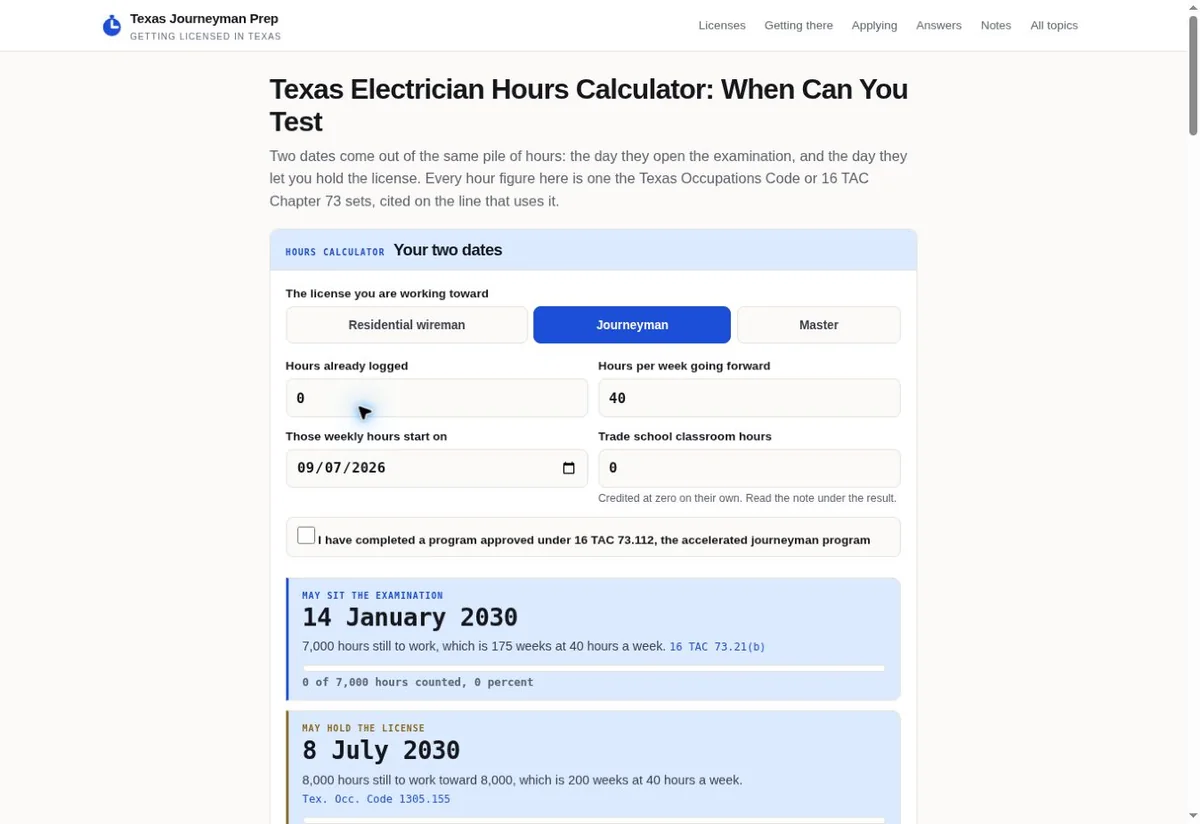
Texas Journeyman Prep calculator with labeled fields
Named inputs in this Texas Journeyman Prep calculator offer context for a proposed appointment-change form. View the project
Hypothetical example An unnamed Avon business checks a request to move an accepted visit

Before

  • A fictional customer has an appointment that staff accepted earlier. They now need a different day. The website offers a blank calendar and a save button, but it doesn't explain whether the old appointment is still held or whether staff must approve the new date.
  • The customer selects a preferred time and sees a cheerful booking message. They assume the change is complete. The receiving staff member sees only a new inquiry and cannot tell which accepted appointment the person intended to move.

After

  • We would propose a page that identifies the existing visit and asks for the replacement date as a preference. The business would confirm whether the first booking stays in place during the check. Our completion text would reflect that approved rule and the actual system response.
  • The staff message would include the link between the original visit and the change request. The person would then receive the business's answer through its confirmed process. This exercise claims no local client, successful transaction or improvement in bookings.

Labeled fields are visible in the Texas Journeyman Prep calculator shown here. We can use it to discuss how a field explains what someone is entering. It doesn't establish an appointment-change process. Your proposed form still needs its own labels, approved booking rules and a tested receiving route.

An owner can judge the concept by trying to explain the result back in their own words. We ask whether the person thinks the visit moved and why. That answer can reveal ambiguous wording. The business then settles the correct state before anyone treats the design as ready to connect to live records.

Should a concept use live customer bookings?
Use agreed sample details while discussing the layout and wording. We can explain what a working connection would need separately. A visual concept doesn't need to expose real appointment records for the owner to judge its meaning. Live handling should follow the approved access and testing arrangement.
What would make the exercise fail?
If the customer can't tell whether their original visit remains accepted, the screen needs attention. We also check whether staff can identify the intended booking from the received details. The exercise should expose those gaps before the owner assumes an attractive calendar solves the entire change process.

Check that the change reaches the booking owner

The staff handoff is part of an appointment-change interface. We check where a marked request arrives and whether the receiving person can find the visit it concerns.

  1. Choose the staff tester Ask the business to involve the person who handles changes in the real calendar. Our screen check needs their answer about the booking record. Someone who only approves the visual design may not know what the receiving team requires.
  2. Follow the request through Send agreed sample information and inspect what the booking owner receives. We ask whether the original visit and new preference are both recognizable. Any missing field becomes a design question before the business relies on the route.
  3. Check the unavailable state Agree what should happen if the receiving system can't accept the request. We can discuss an appropriate recovery contact, then test the actual message. A failure state should avoid telling the customer their booking has changed.

Keep the tests focused on the task you are buying. A website refresh might include a new change page without altering the booking system itself. We discuss that boundary so the price covers the actual work. A working connection to an external calendar needs its own access and behavior checks.

Ask how the business will notice a request waiting for a staff answer. We can discuss notification wording and the information attached to it. The office still decides who answers and how it handles absence. The page shouldn't publish a response deadline that the business hasn't approved and can support.

Does a sent email prove the whole process works?
It proves only the part of the route you actually checked. We need the receiving person to confirm that the message reached the intended place and carries enough detail. The later booking change belongs to the business process. Its completion should be checked before the customer sees wording that implies it happened.
How should suppliers explain an integration limit?
They should identify which system they will change and which system someone else controls. We can discuss access and the checks needed for each part. That makes a proposal easier to compare because a visible form and a connected booking operation involve different work.

Choose a first change that solves a known customer question

A small redesign can focus on returning customers when the main booking route already works. We begin with an actual confusion your staff can explain and the terms needed to fix it.

Which appointment details help on our first call?
Bring your current change instructions and an anonymized example of a customer who misunderstood them. Invite the booking owner who handles changes to accepted visits. The first strategy call is free. That gives us a concrete task to discuss without asking you to prepare a large specification first.
Will this require a whole new website?
The answer depends on the current site and booking connection. We can inspect whether a focused page change addresses the problem or whether the receiving process needs more work. A full redesign should be justified by the actual gaps. The first task may be much smaller than replacing the entire site.
How should we judge the price for the work?
Ask which customer states are included and which integrations need access from your business. We can discuss the change page alongside its error messages and staff route. Compare the proposed acceptance checks, including what happens to the old appointment. A price by page count alone may leave important behavior unexplained.
  • Start with a reschedule question your staff already handles. We can trace it from the customer's wording to the calendar answer. That keeps the proposed feature tied to a real task.
  • Identify the business contact who approves cancellation terms. Our copy needs their answer before it can describe a fee or an exception. A designer should never guess those terms from another website.
  • Check whether old confirmation links remain usable. We can discuss a clearer destination for returning visitors if the current link sends them back into a general sales page.
  • Choose an acceptance check your booking team can take part in. The screen and receiving message should both make sense to the people who use them. Their answers help settle the final wording.

Sources

From the businesses we've worked with

“Trojan Digital Marketing gave our website a complete make over. The board members and I are absolutely thrilled!”
C. Teague McClendonAmerican Veteran Service Corp

KNOW YOUR NEXT STEP

Let’s talk about
Avon.

Based in Indianapolis, we serve businesses across central Indiana, including Carmel, Fishers, Zionsville, Westfield, Noblesville, Greenwood, Avon and Plainfield, and clients across the United States.

Talk with Trojan

Avon, Indiana

Service area map

Explore Avon on OpenStreetMapArea reference; this is not an office pin. Map © OpenStreetMap contributors.