

Questions, answered.
What am I buying when I choose an agent plan?
You're buying Trojan's agreed setup and support work. We configure the selected role, supported account connections, representative tests and team handoff. The written agreement identifies the task and its boundaries. Provider subscriptions and usage are separate, and a role name doesn't include every tool it could ever use.
Which plan should a small business begin with?
Focus suits one role and one defined task. Team fits connected work that needs up to three workflows, while Operations allows a wider agreed setup. We'll choose from the work your staff needs rather than your company size alone. Private hardware or difficult connections can require a separate quote.
Can we choose Hailey without buying every agent?
Yes. Hailey is one setup choice. Tell us which weather or event source, locations and staff destination you want to use. Notices, response drafts and campaign planning can be separate workflows. We'll agree the sending permissions and budget before any customer outreach or advertising action is enabled.
Does Atlas keep all our information on our own computer?
That depends on the complete setup. The agent runtime can operate locally while a selected model or connected app uses an external service. We identify those paths with you. A private or offline requirement needs explicit testing and suitable hardware; the role name alone can't establish that result.
Will Nova get us indexed or ranked first?
Nova can organize authorized search information and prepare a prioritized work list. Search engines decide what they crawl, index and display. We can discuss clearer pages and technical fixes, then inspect available observations over time. An agent setup doesn't guarantee a ranking or inclusion in an AI answer.
Can Penny send invoices or make payments for us?
We can discuss invoice preparation with a finance approval step. Issuing an invoice requires separately agreed tool permissions. Payment actions need their own authorized controls and aren't included just because Penny prepared the fields. Tell us exactly where staff should approve the work before we configure a connection.
Does Mercury's plan include our advertising spend?
No. Your media budget stays separate from Trojan's setup and monthly support fees. We agree the permitted accounts and actions with you. Campaign drafts or recommendations don't authorize a launch. Creative work and ongoing full campaign management can be quoted alongside the agent when you need them.
How do we pay and start onboarding?
Call (317) 981-2386 with the role or task you're considering. We confirm the work, approvals and provider budget, agree the written scope and arrange payment using our existing phone process. Onboarding starts after payment is confirmed. Our contact form offers a callback route if you prefer it.
Can Jamie buy a plan or book my call?
Jamie can explain published options and help prepare a contact request. You inspect the callback note and enter your details before submitting the form. Trojan's team confirms availability, scope and payment. The website conversation doesn't accept your contract or reserve an appointment.
What if the agent needs more monthly runs?
Tell us before increasing the operating allowance. Extra tasks can affect both the plan and metered provider charges. We agree a revised budget and any configuration changes. A run limit doesn't prevent every provider charge, because failures and retries can consume resources and provider billing can arrive later.
Can we take our accounts with us if support ends?
We prefer client-owned accounts and agree the configuration handoff in writing. Provider terms and any custom work affect the details. Managed scheduling and maintenance stop with the support service, so choose who will maintain the task next. We explain that boundary before you commit to the setup.
Should we build an agent ourselves first?
Our DIY guide can help you test a small draft-only task and understand its ongoing care. You can bring that work to us when you need help with permissions, account connections or a staff handoff. We can also discuss a simpler website or process change if it solves the problem sooner.
Choose an agent setup you can explain to your team
Open this walkthroughClose this walkthrough
We set up named AI agents around an agreed business task. Your purchase covers the configuration, connected accounts, test cases and staff handoff in your chosen plan. Tell us what you want the agent to finish. Jeff will help you decide which work belongs in the first setup and which work needs a separate quote.
Focus
Initial setup: 1,497 dollars · monthly care: 249 dollars
One agent role and one workflow, with up to two connected business accounts. We include one hour of monthly support. The allowance is 1,000 processed runs per month.
Team
Initial setup: 2,997 dollars · monthly care: 449 dollars
Up to two roles, three workflows and four connected accounts. Two support hours are included each month. Your plan allows up to 3,000 monthly runs.
Operations
From 4,997 dollars for setup · from 699 dollars for monthly care
Up to three roles, five workflows and six accounts, with three monthly support hours. The run allowance is 7,500 per month. We quote private hardware and complex connections with you.
Phone, text, email, model usage, paid advertising and other provider charges are extra. We agree those accounts and spending limits before launch. Additional support costs 150 dollars an hour when you approve it. A role name doesn't grant access to an account or permission to spend money.
- Choose the task and a likely plan. Start with the role cards below. A short description of the work is enough for our first conversation.
- Call us about the setup. We confirm the accounts, approvals and operating budget, then agree a written scope with you.
- Arrange payment by phone. Our existing payment process follows your approval. Onboarding begins once payment is confirmed.
You can discuss the first task with us at no cost. During business hours, our reply aim for your Trojan inquiry is five minutes. If calling doesn't suit you, leave a callback request and tell us which role caught your attention.
Pick the work before picking a name
Open this walkthroughClose this walkthrough
Caesar, Nova, Hailey, Penny, Atlas and Mercury describe different setup services. We use the names to make the choice easier. The practical question is what each role may read, prepare or change for your business. Two agents with the same name can have very different permissions because their clients need different work done.
Caesar · marketing strategy
Choose Caesar when you need a clearer marketing priority or campaign brief. We start with your business facts, current choices and the person who will use the output. Caesar can help organize an argument for a marketing action.
Nova · SEO and AEO
Nova fits search reports, content questions and work lists from authorized website information. We separate crawl and indexing observations from ideas for stronger answers. Publishing changes needs its own agreed permission.
Hailey · weather response
Hailey helps home-service teams use relevant weather or event notices. Our setup can notify staff and prepare response or campaign drafts for approved locations. Your team controls service availability and any sending or ad spend.
Penny · invoices and admin
Penny prepares office work from approved job information. We can define invoice fields, document checks and a route for missing facts. A draft still goes through the finance or staff approval named in your setup.
Atlas · private and local setup
Atlas addresses where an agent runs and what it can reach. We check the device, runtime, model connection and data access together. A local installation can still contact an external provider if the chosen model uses one.
Mercury · paid campaigns
Mercury supports paid campaign briefs, account reports and draft changes. We agree the approved accounts and spending controls before connecting tools. Media spend and full campaign management are separate from the agent setup fee.
You can also ask us about Jamie, our website assistant. A client setup can give a similar role an approved set of public business answers and an inquiry handoff. Jamie on this site helps explain Trojan's services and prepare a callback request. It doesn't buy a plan, collect payment or confirm an appointment.
We'd rather begin with an exact task than squeeze your business into every role. For example, an office may need Penny to prepare a draft from a job record. Adding Mercury won't improve that invoice. If the next problem is campaign spending, we can discuss that as a separate piece of work.
Read our AI and automation service page when you want to compare broader workflow options. This hub explains the named setups and purchase choices. The broader service page covers the kinds of systems and recurring work we can discuss with you.
Know what your plan includes
Open this walkthroughClose this walkthrough
A plan needs plain units so you can tell when a change adds work. We agree one business and its approved service areas before setup. Focus covers one area, Team covers up to two, and Operations covers up to three. An area unit covers one county or a list containing no more than ten ZIP codes.
The territory describes the information and operating rules we configure. It doesn't promise demand, complete weather coverage or search visibility in every location. A business that serves several disconnected areas may need different routing or notices. We'll discuss that layout before assigning its plan.
A contractor's possible Team setup
Imagine a contractor choosing Hailey for an internal notice and Caesar for a response brief. We could discuss three workflows: a relevant event reaches staff, staff requests a draft, and an approved request produces a campaign brief. This is an illustrative buying example. It doesn't describe an installed client system.
Your actual plan depends on the connections and actions you need. A notice delivered to an existing staff account differs from a message sent to customers. We ask who can approve each output and whether the source check costs fit your provider budget. If the team only needs the first notice, a smaller setup may be enough. We can discuss that choice before you buy several connected tasks.
| Unit | What we count | What to tell us |
|---|---|---|
| Agent role | One configured responsibility, such as Nova's search work. | The output your staff will use and the person accountable for it. |
| Workflow | A defined trigger and output. We allow one approval point and a maximum of five actions. | What starts the task and where it should finish. |
| Business connection | One authorized account for one service. | Who owns the account and can grant the required access. |
| Processed run | One handled event or requested task. Retries count too. | Your expected task volume and how bursts should be handled. |
| Support time | Corrections and small updates to existing work, alongside its monthly check. | Which staff member can approve extra work. |
Hosting and the operating model are additional provider services. They don't become free because they're outside the connected business account count. We can use client-owned accounts billed directly, or agree documented provider charges passed through at cost. You'll know which arrangement applies before the work begins.
We include one training session within the plan's team size. Focus allows up to three people, Team allows five, and Operations allows ten. Choose people who will actually handle the output or change a setting. Training a larger group or several shifts belongs in the written agreement.
Operations can begin with 150 knowledge pages or files. Team's initial allowance is 75; Focus includes 25. Each needs to be text-ready and no larger than five megabytes. A scanned archive needing transcription or a large document collection needs its own estimate. We won't pretend that uploading a folder settles its accuracy.
What if one task needs several approvals?
Tell us how the task really works. A workflow allowance includes one approval step. Separate finance, manager and customer approvals may require a different design or more than one workflow. We can price that honestly before you commit.
Does a failed task still use the allowance?
Yes. Processing and retries can use provider resources even when the task doesn't reach its intended result. We set a bounded failure path and make repeated failures visible. The monthly run allowance doesn't buy unlimited attempts or prepaid model usage.
Bring us a task that already has an owner
Open this walkthroughClose this walkthrough
The strongest starting point is a piece of work your staff can describe today. We ask who does it, what they need to know and where it gets stuck. A sentence such as "our office checks the same invoice fields each morning" gives us a better first discussion than a request to automate the whole company.
Jeff will ask what a correct output looks like. You might show us an approved invoice draft, a campaign brief or the wording staff uses to answer a common service question. Remove private customer details from a first example. Our initial call is for choosing the work and the route into a proper setup.
We also ask what should stop the task. Missing job details, an expired weather notice or a conflicting price can change the answer. Your staff may already know the rule but keep it in their heads. Getting that rule into the agreed setup is part of making the agent usable.
A staff owner matters after launch. Someone needs to correct a source when your business changes and decide whether a failed output is safe to retry. That person doesn't need to become a programmer. They need a clear route to pause the work and contact us when a change exceeds their authority.
- Name the current job. We want to hear the task in your team's language, including the part that causes repeated checking.
- Show a safe example. An approved, redacted input and output help us see the required fields without exposing a customer's record.
- Choose its staff owner. Decide who receives the result, handles exceptions and approves any action beyond a draft.
- Identify the accounts. List the services involved and who can grant access. Avoid sending passwords through a website conversation.
- Agree the stop rule. Describe a missing fact or failed connection that should send the task back to a person.
Our first setup can stay narrow even when your long-term idea is larger. A team might start by preparing a daily list of unresolved requests. Connecting outbound messages comes later, after the team trusts the list and has agreed who may send them. We'll discuss that progression without promising an automatic expansion.
If your current process is inconsistent, we may need to settle its steps before configuring an agent. That can reveal a simpler fix. A clearer form, a staff checklist or a website edit may remove the problem on its own. We can discuss those options through our existing web and automation services.
Separate our service fee from running costs
Open this walkthroughClose this walkthrough
Our setup and monthly fees pay for the agreed Trojan work. Connected services can charge for use. We keep those costs visible because a busy month, a repeated failure or a longer conversation can change the bill. You should understand the operating budget before staff relies on the workflow.
Phone work may involve a number rental, incoming and transfer minutes, transcription and speech services. Text messages may have segment and carrier charges. Email tools can have subscriptions or delivery limits. The provider and the enabled modules determine those costs, so we confirm them for your actual accounts.
A plan doesn't automatically include voice, SMS and email together. Optional channel ceilings apply only when the approved workflow uses that channel. Focus can have ceilings of 300 voice minutes, 500 text segments and 5,000 email deliveries. Team's ceilings are 900 minutes, 1,500 segments and 15,000 deliveries.
Operations can have ceilings of 2,000 voice minutes, 3,000 text segments and 25,000 email deliveries. These are operating limits to agree for the relevant modules. They aren't prepaid provider balances or promises that every setup sends that volume. A wider allowance needs your approval and an updated operating budget.
For an agreed website conversation workflow, one run covers up to eight visitor questions. Voice work has a ten-minute call limit and a human handoff; each call counts as one run. It uses one incoming number and one transfer destination unless we agree a wider arrangement.
We set the supported spending controls for your chosen services. An alert marks 80 percent of your approved budget. At the ceiling, optional outbound work pauses or routes to your named contact. Provider reporting can arrive late. We retain a safety buffer and explain the actual controls each provider supports.
Weather or source polling without a matching event sits outside the processed run count. It still belongs within the approved API budget. Source checks consume provider resources, and your account's pricing determines the charges. Our agreement should say how often a check is needed and what happens if the source is unavailable.
Paid advertising needs a separate media budget. Mercury or Hailey may prepare a campaign recommendation without permission to launch it. If you want approved account actions, we define them with the spend controls. Creative production and ongoing full campaign management remain separate work to quote.
Can we begin without outbound messages?
Yes. We can discuss a draft-only task or an internal staff notice first. That gives your team a chance to check the output before adding a customer-facing channel. The provider accounts and usage still depend on the agreed design.
What happens to unused support time?
The included hours expire each month. They're reserved for current operating checks and small changes to the agreed workflows. A larger project can be estimated separately, and we ask for approval before charging extra support at 150 dollars an hour.
Agree who controls the accounts and actions
Open this walkthroughClose this walkthrough
We prefer client-owned provider accounts where the services allow them. Your business can see the billing and decide who has access. During setup, we identify the account owner and the permissions needed for each task. A general administrator login shouldn't be the default answer to every connection.
An account may let us inspect a campaign without letting us alter it. An invoice draft can also need separate authority before anyone issues it. We spell out those distinctions in the work you approve. If you only want drafts, the configuration should make that limit clear to staff and to the connected tools.
Keep customer records inside the approved project process. Our public website assistant uses public Trojan material. A client agent connected to private information needs its own access plan and source rules. Sending a confidential file to the public chat doesn't create a private client workspace.
Atlas can help you examine local deployment, but the word "local" needs a practical explanation. The device may run the agent software while a remote model handles an answer. We identify each connection and what information it receives. Your hosting choice alone cannot settle every data question.
We document the account and configuration handoff for the work we set up. Your agreement needs to address any provider restrictions, custom development and retained support access. When monthly support ends, managed scheduling and maintenance end with it. Your staff should know which tasks then need another owner.
Don't share a single password across the whole team just to make onboarding quick. Where supported, we use named access and the required permissions. If a tool needs a different approach, we discuss the tradeoff with the account owner. Changing an employee's role should include checking their agent access.
Public web content can contain instructions that conflict with your own rules. A source page should supply information, while your agreed permissions decide what the agent can do. We can test attempts to redirect a task, request extra access or hide an action inside a source document.
A person should remain able to pause the workflow. We agree where that control lives and who may use it. A failed connection or an unusual output needs a visible path back to staff. The setup should leave you able to decide whether the next run is safe.
Test the handoff before staff depends on it
Open this walkthroughClose this walkthrough
We test representative tasks from the work you approve. An easy input is only part of that check. Your team also needs to see what happens when a price is missing, a service falls outside the area or a connected account is unavailable. These cases show whether the setup respects its boundaries.
| Test | What we check together |
|---|---|
| Expected input | The output uses the agreed source facts and reaches the named staff destination. |
| Missing information | The task asks for the required fact or stops at the approved exception path. |
| Conflicting source | Staff can see the conflict and resolve which record governs the answer. |
| Repeated event | A retry follows the agreed repeat rule and doesn't quietly create a second action. |
| Unavailable account | The failure becomes visible, and the task follows its bounded retry or staff route. |
| Permission request | Access beyond the approved tools is refused or held for the right person. |
For Penny, we might test a job record without a tax field or an invoice reference already used. The finance owner decides the required treatment. For Hailey, we might use an expired event or a location outside the agreed territory. The team should see why that notice doesn't trigger the normal response.
For Nova, a search report with no matching period should make the missing comparison clear. For Mercury, an instruction to increase spend beyond the allowance should reach the approval boundary. Those examples are planning cases. They don't describe measured results from a past client agent installation.
We check where the output appears. A technically correct draft can still land in an inbox nobody owns. Staff needs a recognizable label and enough source context to act. If a message requires a reply, the setup should show who receives that reply and what happens after their business hours.
The handoff also needs a way to report a bad answer without repeating private data in several places. We agree which record or task reference staff can send us. That lets us investigate the behavior while respecting the access arrangement. A screenshot of an error may need redaction before sharing.
We don't promise a universal launch date from a plan card. Account approval, source quality and the work you choose affect the sequence. Our call identifies what must happen before onboarding and which client decisions could hold it up. We'll confirm the actual work and timing in your agreement.
Once the approved workflows go live, monthly support covers operating checks and corrections within your allowance. A new output channel or a substantially different task can need another estimate. We explain that boundary so a small change request doesn't become an open-ended project without your approval.
Look at the controls the person will actually use
Open this walkthroughClose this walkthrough
Our existing project work gives you something concrete to discuss on the call. A visitor needs to understand an input, identify the action and know where the result goes. Those details matter for an agent handoff too. We can examine them without pretending a website screenshot is a client agent deployment.
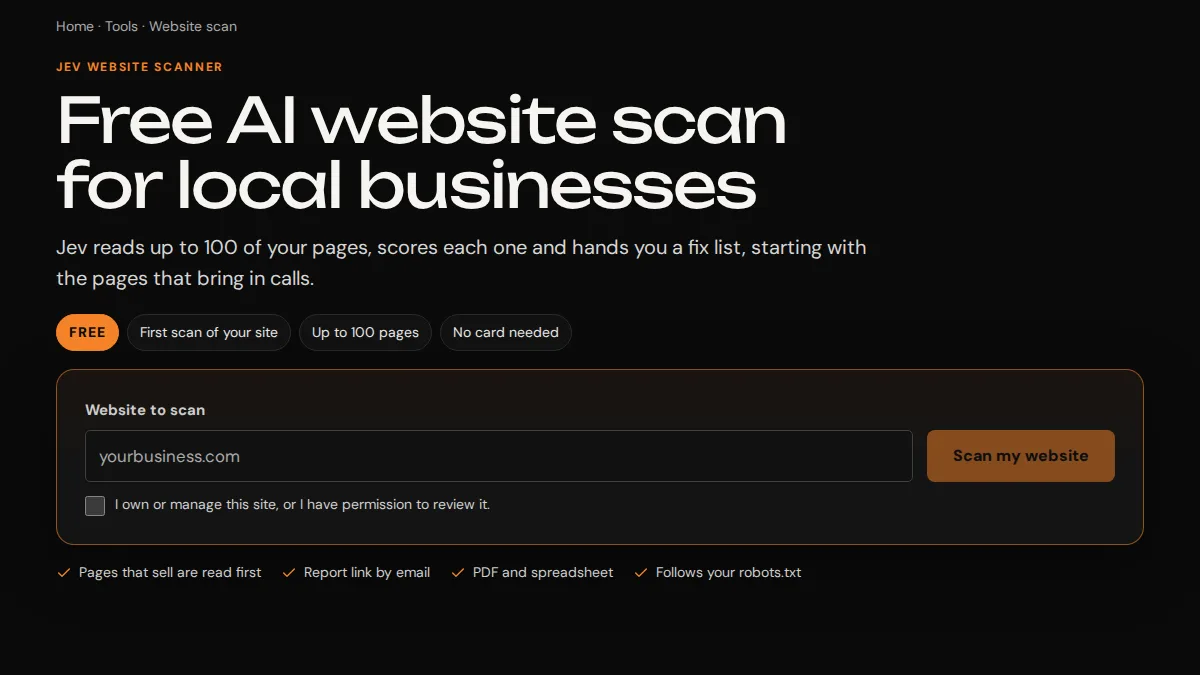
The Jev website scanner asks for a site address before the scan begins. For an agent setup, we use the same plain question: what input lets the user start the intended job? A button shouldn't imply that an invoice was sent or a campaign launched if it only prepared a draft.
We also discuss labels for incomplete work. If the output is waiting for a manager, staff should be able to tell that apart from a completed action. A status can point to the person who needs to act. It should stay understandable even when a model's explanation is long or uncertain.
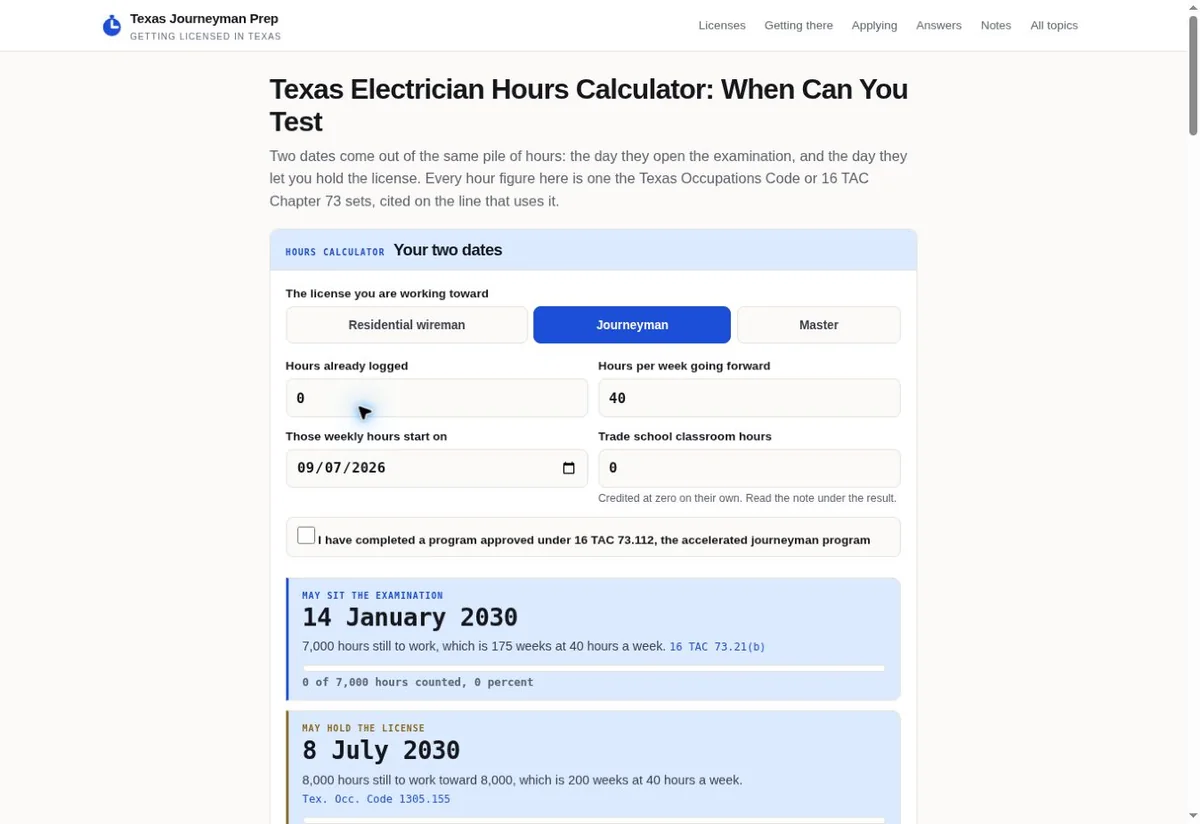
In the Texas Journeyman preparation project, the calculator presents labeled fields for a defined task. Your agent may need a job reference, a source date or an approved account. We identify those inputs from your process rather than asking users to type a long instruction each time.
People also need a correction route. A user may spot a wrong number after entering it, or a manager may return a draft with a question. We discuss how that correction travels through the workflow. Repeating the entire task can cause extra runs or repeated actions if the design doesn't distinguish an amendment.
Keyboard access, clear focus and readable status text belong in the interface discussion. We preserve the distinction between a navigation link and an action button. A client setup may use an existing business app rather than a custom website screen. We'll agree the interface that staff can actually operate.
Understand what Jamie can help with here
Open this walkthroughClose this walkthrough
Jamie is the assistant on Trojan's website. It can help you explore published services, discuss a suitable next step and prepare callback preferences. You can ask about a role or compare the plans on this page. The final decision about your client setup belongs in the conversation with us.
Our website conversation is separate from a configured agent connected to your business. Jamie doesn't have your office records or access to your advertising account. Describing a task here can help us understand your inquiry. It doesn't authorize a campaign action, transfer funds or start a paid setup.
If the live AI response is unavailable, the website can still offer a source-based reply. Our existing contact route remains available too. We want the next step to stay usable when one connection fails. You don't need the assistant to read this page, choose a plan or call Trojan.
When you choose the callback path, Jamie can help carry a service choice and planning note to the contact form. You inspect those details and enter your own contact information before sending. Staff confirms availability and the preferred callback time. The conversation itself doesn't reserve a place on a calendar.
For a similar setup on your business website, we would agree the facts it may answer and the next action it may offer. A service list, prices and business hours need an update owner. A conversation should be clear when a request needs human confirmation or falls outside the approved information.
We'd also decide which details belong in a callback note. Collecting a customer's preferred time can be helpful. Collecting private financial or medical information in a general service chat can create a different problem. Your source rules and inquiry fields should match the actual business need.
Jamie may guide a buyer toward Focus, Team or a wider conversation, but the written agreement sets what we sell. If your question involves private deployment, hardware or several approvals, we need to talk it through. The public answer shouldn't hide that extra work behind a simple monthly price.
Decide whether to configure it yourself or ask us
Open this walkthroughClose this walkthrough
You can build your own business agent if you have the time and the right person to maintain it. Our business AI agent guide walks through a small first task and the choices behind a working setup. It can help you decide what you want to handle yourself.
Buying our setup gives you an agreed piece of configuration and support work. It doesn't remove your responsibility for approved business facts or staff decisions. We need your account owner and task owner involved. An agent can only follow a reliable process if the business has decided what that process is.
DIY can be sensible for a draft-only task using public information. A workflow that issues invoices, sends customer messages or changes account spending needs a closer permissions check. Consider what happens when the person who built it is away. Someone else needs to know how to pause and maintain the work.
For a weather-driven contractor idea, read our weather response agent guide. It explains the path from a source notice to a staff action. Pair it with Hailey's service page when you want us to configure that path using your approved territories and accounts.
Atlas is the relevant role when your main question is local or private deployment. Nova fits the search task itself. Choosing the runtime and choosing the work are separate parts of the same purchase. We can talk through both without suggesting that one provider or machine suits every business.
Our human approval guide is useful when your team needs to decide where a person should intervene. That existing guide deals with approval in recurring work. The new DIY guide focuses on building the agent, while this hub helps you choose and buy our setup services.
Bring any existing automation to the first call. We may be able to work with it, or it may impose limits on the new task. We need to know which service owns its schedule and what a second system would change. Adding another tool without checking the first can create duplicate notices or conflicting actions.
If none of the role descriptions fits, tell us about the work rather than choosing the nearest name. Custom development, difficult account connections or model adaptation need a separate quote. Our web application service explains the broader development conversation when an agent setup alone won't cover it.
Plan the month after launch and the day you leave
Open this walkthroughClose this walkthrough
Ongoing support should have an owner and a boundary. We include operating checks, corrections and small changes within your monthly hours. New workflows, account migrations, substantial data cleanup and special model work need another estimate. We'll ask before treating those changes as chargeable extra work.
Your business facts will change. A new price, service area or staff contact can affect several answers. Decide who tells us about those changes and which records they update. If one old file remains available, the agent may continue to find it. We need a clear rule for retiring outdated information.
The support fee starts once your agreed workflows are live. Renewal then follows a monthly schedule. The written agreement confirms payment and cancellation terms before you commit. A cancellation should be raised before the next renewal. We'll identify the handoff of your accounts and configuration and the managed work that ends with support.
If an agent runs on a local device, your team also needs a plan for that device. Power, updates, backup and staff access can affect availability. Hardware and special device support are separate costs to agree. We won't assume a computer left in an office has an owner just because it can run the software.
Keep the original account ownership visible. If a staff member leaves, remove their access through the provider's supported controls and check the workflow destination. An agent still sending notices to an unused inbox can look active while nobody receives the work. We include that sort of operating question in the agreed checks.
You can choose a smaller ongoing arrangement than your eventual vision. We can discuss which approved workflows are actually used before expanding. More agents or runs are worthwhile only when their tasks help your staff. The purpose of the plan is to make the work and its costs understandable.
Call us with the task you want to improve, the likely role and any account limits you already know. We'll help you choose the next step, confirm the work and arrange payment through our existing process. You can read every role and guide without opening the website assistant.
Sources & further reading
YOUR NEXT MOVE
Make the next step count.
Based in Indianapolis, we serve businesses across central Indiana, including Carmel, Fishers, Zionsville, Westfield, Noblesville, Greenwood, Avon and Plainfield, and clients across the United States.

