Need help?Jamie

Market service plans

Keystone Crossing Website Design That Explains What You Do

Your firm does careful, high-trust work, but the website reads like a brochure, and prospects still ask on the first call what you actually do.

Trojan Digital Marketing designs websites for consulting and professional firms in Keystone Crossing, Indianapolis, Indiana. Each service you sell gets its own page, so a prospect knows the scope before your first call. In 2024, 14% of Indianapolis workers worked from home, so your contact page should explain a video meeting as clearly as an office visit.

Send the form with your site link and the question prospects ask most before booking a meeting. The first strategy call is free, and during business hours we aim to reply within five minutes.

  • Engagement pages a partner can forward
  • Project stories with your role spelled out
  • A meeting request that asks about stage

We have more than 1,400 live websites, and since we're owner-run, Jeff Clerisier is who you'd work with during the build. On a firm's site, we'd skip the bare logo wall and show a few project stories that spell out your part in the work.

Illustrative creative production workspace.
IllustrationThis page drawn as a wireframeThe headline, highlights and button from this page, redrawn in desktop and phone layouts. It’s an illustration of page structure and isn’t a client site.PAGE WIREFRAMEtrojandigitalmarketing.com/indianapolis…Keystone CrossingWebsite Design ThatExplains What You DoEngagement pages a partner can forwardProject stories with your role spelled outA meeting request that asks about stageBook a free website call010203KeystoneCrossingWebsiteDesign That…Engagement…Project…A meeting…Book a free…

YOUR WORKING BRIEF

Choose where to start

Select the parts you want to discuss. Your choices carry into the inquiry form.

Discuss this service0 priorities selected

SEE HOW WE CONNECT THE PIECES

Explore the decisions
behind our plan.

A website built around the next customer decisionMESSAGE · EVIDENCE · ACTION
  1. A clear offer
  2. Evidence for the customer
  3. An action that works on mobile
A website built around the next customer decision

When we plan a Keystone Crossing firm's site, we start from the question prospects ask most before booking, which you send us with your inquiry. On your new site, the meeting request form asks each prospect about their stage and timing, so your team can prepare for the first call.

Keystone Crossing: Offices and campus: The Keystone Crossing campus operator describes offices alongside meeting spaces, dining, and other workplace amenities. A campus description says nothing about your work, so the pages show what your firm delivers and the proof each client has cleared.

Questions about website design in Keystone Crossing, Indianapolis, Indiana

How much does a website cost for a Keystone Crossing firm?

Your site's price is set after the free strategy call, when we know how many engagement pages and project stories it needs. A practice that's just opening can start with the Marketing Startup Kit at $7,997, or three monthly payments of $2,799. The kit pairs a custom 15-page website with 20 SEO blog posts, and it adds Google Business Profile setup or optimization plus three months of consulting.

How long does a new firm website take?

The Startup Kit's example schedule puts discovery in week 1, design and build in weeks 2 to 4, blog posts and profile work in weeks 5 to 8, and the launch in the weeks 9 to 12 stretch. A redesign on its own is scheduled after scope review. Partner sign-off on bios and project stories sits inside that schedule, so decide early who approves them.

Should our website explain how to find the Keystone Crossing office?

Yes, if clients come to you. The campus operator describes offices alongside meeting spaces and dining, so tell visitors which building and suite you're in and where to check in. In 2024, 71.8% of Indianapolis workers drove alone to work, so a line about parking helps anyone driving over. If most first meetings happen by video, say that plainly too.

Can the site show client work we can't name publicly?

Yes, with the client's agreement. A project story can describe the problem and your part in solving it, with names and identifying details removed. If even that's too much, a sample deliverable built from dummy figures and labeled as a sample can show how you work. Logos and results only go up when you have permission to publish them.

Do we still need a downloadable capabilities PDF?

Keep it if procurement teams ask for one, but put the same content on a web page as well. A PDF travels without context, while a page stays current and opens properly on a phone. Indianapolis is home to Fortune 500 headquarters including Elevance Health and Eli Lilly and Company, and a vendor review at a company that size can pass through people who never meet you.

What if the new site doesn't bring better inquiries?

Then the form data will show it, and that's where changes start. A new site is judged by whether inquiries arrive with the context your team needs, so the form asks about the organization and its stage up front. If briefs still come in vague, the questions get sharper, or the engagement page gets a plainer statement of who the work fits.

“I had a great experience working with Jeff…”
Heather DoanGoogle review
“…drove a noticeable uptick in leads within just a few weeks…”
Mike BamosiGoogle review

Jeff Clerisier founded Trojan Digital Marketing in March 2018.

We’re based in Indianapolis, where the city and Marion County share one government, Unigov.

We also work with clients across the United States.

Read our Google reviews

What Indianapolis facts should a Keystone Crossing firm's website plan for?

Plan your meeting page for both a drive over and a video call, since most Indianapolis workers drive alone to work and 14% work from home.

  • Indianapolis workers average a 24.6-minute commute. In 2024, 71.8% drove alone to work and 14% worked from home.

    Put parking and check-in notes right beside the video link on your meeting page, so neither kind of visitor has to email to ask how the meeting works.

    Data USA, Indianapolis city (balance) profile, with Census Reporter for the commute timeChecked September 25, 2026
  • Elevance Health, Indiana's largest Fortune 500 company, and Eli Lilly and Company both have their headquarters in Indianapolis.

    If you sell to large employers, several people may read your engagement pages without ever meeting you, so each page has to make sense on its own.

    What Fortune 500 Companies Are Based In Indiana?Checked September 25, 2026

Both facts describe Indianapolis as a whole, since the research holds nothing on Keystone Crossing itself. Neither company is a client or project of ours.

Who brings what to a firm's website project?

A firm's website moves at the pace of its approvals, so this splits what you supply from what we build.

  • The engagements you sell, in the words clients use for them
  • Project stories each client has cleared for publication
  • Bios and credentials each partner has approved
  • The questions prospects asked in recent first meetings
  • The person who answers new inquiries
  • A page map with one page per engagement
  • Project story layouts that show your role and the deliverable
  • A meeting request form that asks about stage and timing
  • Office and video meeting details on the contact page
  • Phone and keyboard checks before launch

What happens in each week of a firm's website build?

The Startup Kit's example schedule runs from discovery in week 1 to launch in weeks 9 to 12, and a redesign on its own is priced after the free strategy call.

  1. Discovery and engagement mapWe list the engagements you sell and the searches a buyer might use for each, so strategy is settled before any design starts.Week 1Together
  2. Engagement pages designed and builtThe custom 15-page site comes together in weekly iterations, with two formal revision rounds where partners can mark up bios and project stories.Weeks 2 to 4Our team
  3. Blog posts and profile workTwenty SEO blog posts go live in these weeks, alongside the finishing work on your Google Business Profile and the site's schema.Weeks 5 to 8Our team
  4. Launch, then three months of consultingThe site goes live, and consulting adjusts pages based on what the first meeting requests show about your visitors.Weeks 9 to 12Together

Build the opening around a decision the firm supports

A professional website can feel polished while saying little about why a customer should contact the firm. We begin with the practical decision your service helps a client make, then choose a visual presentation grounded in actual work. That may be a project sequence, an annotated deliverable, or a clear explanation of an engagement.

The first screen introduces the capability and next action without relying on a vague promise of change. Supporting sections show the process, the evidence, and the roles involved. The design should make the firm’s judgment visible through its work, rather than through a collection of decorative business icons.

Give project evidence more context than a logo wall

A meaningful project story explains the request, your role, constraints, and the delivered work. We can design an interactive sequence that allows the visitor to examine those elements at their own pace. Approved documents or screenshots can show what a deliverable looks like, with private information removed before publication.

A client logo requires permission and a truthful relationship. It does not establish a measured business outcome. We structure the evidence so it supports the capability described on the page, while keeping the distinction between visible work, client feedback, and quantified results clear.

Prototype a proposed specialist consultation journey

Suppose a hypothetical design consultancy receives broad meeting requests with no project context. We would prototype a service chooser that distinguishes an exploratory discussion from a defined project review. Each choice explains the relevant preparation and sends the visitor to a short form suited to that stage.

The form could ask about the organization, project purpose, current stage, and preferred contact route. It would avoid demanding confidential documentation before a relationship exists. The confirmation would describe receipt and review, while any actual calendar reservation would use a system that can confirm availability.

Make supporting material easy to share internally

Professional purchases often involve someone sending the website to another decision maker. We design service pages that stand on their own, with useful headings and direct links to relevant evidence. A person arriving at a project detail should understand its context without first watching a long opening animation.

Downloadable material can complement the page, but it should identify its purpose and currency. The website should retain enough text to explain the offer without a download. We also consider print or save behavior where a buyer may need to discuss the scope internally before requesting a meeting.

Use motion and performance checks with purpose

Subtle transitions can connect stages of a process or reveal an annotated project detail. They should not slow the path to the actual service explanation. We prepare responsive images and test the project viewer, navigation, and inquiry form on representative screen sizes.

Google’s Core Web Vitals guidance separates loading, responsiveness, and visual stability. Our acceptance checks use those concerns alongside keyboard access and reduced motion behavior. The report states the tested conditions, rather than turning a laboratory observation into a universal promise about every visitor’s experience.

Define ownership of content and inquiry handling

The proposal can include a journey map, visual prototype, service content, project templates, and form implementation. Your team supplies approved work examples, service boundaries, and the person responsible for incoming briefs. The CMS handover explains how to add a project without changing the visual standards or overstating its results.

After release, evaluate whether prospects understand the engagement and whether the team receives enough context to respond. A lower volume of unsuitable meeting requests may be useful, but it needs interpretation alongside relevant opportunities. The design scope focuses on a usable business journey rather than a guaranteed increase in contracts.

Put the first scope in order

  1. Select approved project material that demonstrates the service being offered.
  2. Prototype the evidence sequence and a meeting request suited to the buyer’s stage.
  3. Test sharing, accessibility, and the context received by the responsible professional.

Explore Keystone Crossing marketing planning for the wider district approach, or return to Indianapolis marketing services. The full website design service explains the broader engagement.

Discuss Keystone Crossing website design with Trojan Digital Marketing. Bring the current website and the customer decision you want the project to address so we can define the relevant work, approvals, and review evidence.

Sources & further reading

Talk with Trojan Digital Marketing

Set the intake limit before putting a document button on the page

A professional intake page should say which details belong in the first request. We can build that boundary once the firm names the information it can receive at that stage.

  1. Name the first conversation Tell us what the first request starts within your Keystone Crossing firm. A general consultation request may need little more than a subject and a contact route. A later assessment may need records the public form should never request. We should separate those stages before choosing fields or adding an upload control.
  2. List what the receiver actually needs Ask the intake contact to describe the details needed to assign a request. Avoid collecting a full account of the matter if a short subject will do. Our form brief should explain why each field exists. A field without an operational purpose adds work for the visitor and for the staff who must handle it.
  3. Name the details that should wait Have the firm approve a plain instruction about information customers should hold back. Do not rely on a privacy link to communicate the immediate boundary. We can place the instruction beside the relevant field. The firm decides how a later document exchange begins and who may authorize the channel used.
  4. Check the same boundary in the receipt The completion message should reflect the stage the request has reached. It can confirm receipt if that is what occurred. Our wording should leave the next document step with the person authorized to provide it. The visitor should not assume that sending a request establishes a professional relationship or accepts the matter.

For a firm in Keystone Crossing, Indianapolis, Indiana, the intake page can be a public starting point even when the work itself is private. Ask the partner responsible for intake to define that public task. We can then explain it without naming a real matter or copying a private message into a design sample.

A test brief can use invented names and clearly marked test details. The point is to examine the path before real information enters it. We can ask the receiver to find the test request and describe what they would do next. That check gives the proposed form a concrete acceptance task without creating a client story.

Keep the first check small enough for the firm to repeat. Ask one staff member to use the public page and another to find its safe test record. We can compare the two views while each person follows their normal role. A gap between them gives the build a clear issue to resolve before the route is accepted.

Can we publish a general invitation to send documents?
Only after the firm approves what it can receive and how that route operates. An upload control invites a specific behavior. We need to know which documents are relevant and what staff do with an unexpected file. If those details remain unsettled, the first page can ask for a subject while staff provide later instructions through the authorized process.
What if visitors explain a private matter in the subject field?
Ask the firm to approve a short prompt that requests a broad topic and discourages unnecessary detail. We can test whether a person understands the wording before filling it in. The system owner should determine how unexpected information is handled. A better label can help describe the boundary, but it does not guarantee what every person will submit.

Define who may receive an attachment before deciding where it goes

An optional attachment needs an approved receiving route and a named owner. We discuss those responsibilities before treating a document control as part of the consultation website.

Yahweh House of Prayer public church homepage
Attachment path: Church homepage displays public information. View the project
Consultation intake acceptance matrix
Question or recordBusiness inputAcceptance check
Initial subjectThe intake partner supplies the broad subjects staff can assign without opening a document. Our draft uses those approved labels.Send a marked test topic and have the receiver describe the intended first action. The page should collect enough context for that assignment.
Optional documentThe firm identifies the document types it is prepared to receive at this stage and the account that holds them.We inspect the test path with the account owner. Receipt, storage and staff access are distinct checks; a success message alone settles none of them.
Incomplete requestThe receiver states which missing detail prevents assignment and approves a correction prompt.Omit that detail in a safe test. Check whether the visitor can identify the correction without seeing another person's information.
Staff assignmentThe firm names a primary receiving role and the approved substitute process. We need those roles before implementing routing.Ask the substitute to locate a marked request using the access the business permits. The result should agree with the proposed handoff.

An attachment may move through more than one system. The website could pass it to an existing intake service rather than keep a copy itself. We need the service owner to confirm how that arrangement works. A proposed design should identify the accounts involved and the staff responsibility at each handoff.

The church homepage pictured beside this section provides an example of public organizational information. It cannot establish an attachment route for a professional firm. Our document discussion should use your approved workflow and a test file made for that purpose. Keep private working records out of a public design presentation.

Should a contact form send the file to every partner?
The firm must decide who needs the information to perform the intake task. We should understand that access choice before implementing any notification. A broad distribution list can create extra copies that the receiver did not need. Ask the account owner to approve the actual route and the message content sent to each role.
Can a file size limit settle the document risk?
A size limit controls one property of a submitted file. It does not establish that the person is authorized to send it or that the contents are appropriate. Our work needs the firm's approved handling rules as well as the system restrictions. Those questions belong with the responsible business and system contacts before the control is accepted.
What should happen to a file staff cannot use?
Ask the firm to specify the response and the person responsible for it. The website may need a clearer instruction about acceptable inputs. We can explain the approved correction route without describing confidential file contents in a public error message. The business decides any later handling action in the receiving system.

Let a visitor name the subject without diagnosing the engagement

A practice chooser should use topics the visitor can recognize. We can help the firm separate a public subject choice from the professional judgment needed to accept an engagement.

What if two practice labels sound the same to a visitor?
Ask the intake team for the distinction they use when routing a broad request. Then describe it in ordinary language next to each choice. We can test the labels with a fictional situation rather than a real confidential matter. The visitor should be able to choose a likely subject while staff retain the ability to correct the assignment.
Can someone choose that they are unsure?
An unsure option can fit the process if a named receiver handles it. It should explain the broad information that person needs next. We would check where such a request lands instead of letting it disappear into a catch-all inbox. The firm decides whether the initial subject is enough or whether staff must ask a clarifying question.
Should choosing a topic reveal a longer form?
Only add questions when the firm can explain why they are needed at that stage. A topic choice need not trigger a full case history. Our prototype can show which fields change and why. Ask the intake receiver to assess the additional answers, so the design does not collect details that staff ignore or cannot safely use.
Can the page recommend a specific professional service?
The page can explain the services the firm approves for public description. It should not present a broad topic selection as an assessment of a visitor's matter. We can label the choice as a routing step and preserve any staff-confirmed acceptance process. The responsible professional should approve wording that could otherwise imply a service has been selected.

A clear subject label needs enough context to stand on its own. People may arrive on the consultation page through a saved link. They should not have to read the entire firm website to understand the available choices. We can provide short explanations for the approved topics without restating every service page.

Keep the internal department code behind the public label if the receiving system needs it. A visitor may recognize a question better than the firm's organizational term. Our implementation can carry the approved routing value while presenting understandable wording. The system owner should check that the selected label still maps to the right receiver.

A correction message should name the missing field without repeating the matter

Intake feedback should explain the correction needed and the submission status. We can write concise messages that help the visitor without displaying supplied private details in the public response.

  • For a missing contact route, explain which field needs an entry. The firm should decide whether an email or another approved contact option is required. We can make that requirement visible before submission. A generic failure banner leaves the visitor unsure whether the request was sent.
  • For an unsupported file, state the approved correction instruction. Avoid echoing the file contents into the error screen. Our test can use a harmless sample file and inspect the message shown. The account owner decides how the receiving system handles any rejected submission.
  • For a successful first request, describe the completed action accurately. If staff still need to assign it, the receipt can explain that pending step using the firm's wording. We should not claim that a consultation is booked when the system has merely received a message.
  • For an unavailable receiving service, give the fallback route the firm can support. A page should not invent a response deadline or suggest that the visitor keep resending private documents. We can discuss how to keep the status clear while the business handles the interruption.

Look at the message on the same screen as the affected input. The visitor needs to know which change will let them proceed. Our form test can deliberately leave a required field empty and check the correction path. The firm should approve the data used in that test and the behavior expected after it.

Try the feedback using keys, then repeat with a pointing device. A visible change may be hard to locate when focus stays elsewhere. We can include a keyboard task in the acceptance discussion and ask the implementer how feedback is exposed. A static image cannot establish whether that interaction works.

Can a success page repeat everything the visitor entered?
Ask whether the summary serves a real task and which details the firm permits it to display. The page may only need to confirm the broad request type. We can use a test record to examine what appears after submission. The firm should approve any return of supplied information before it becomes part of the public response.
What if staff later find the request incomplete?
The later correction belongs to the firm's approved communication process. Our website task can explain what the first request requires and how staff may contact the visitor. It should not pretend that every intake issue can be settled in browser validation. The receiver remains responsible for assessing whether the information is sufficient to proceed.

Use an interface reference to discuss labels, then test your own task

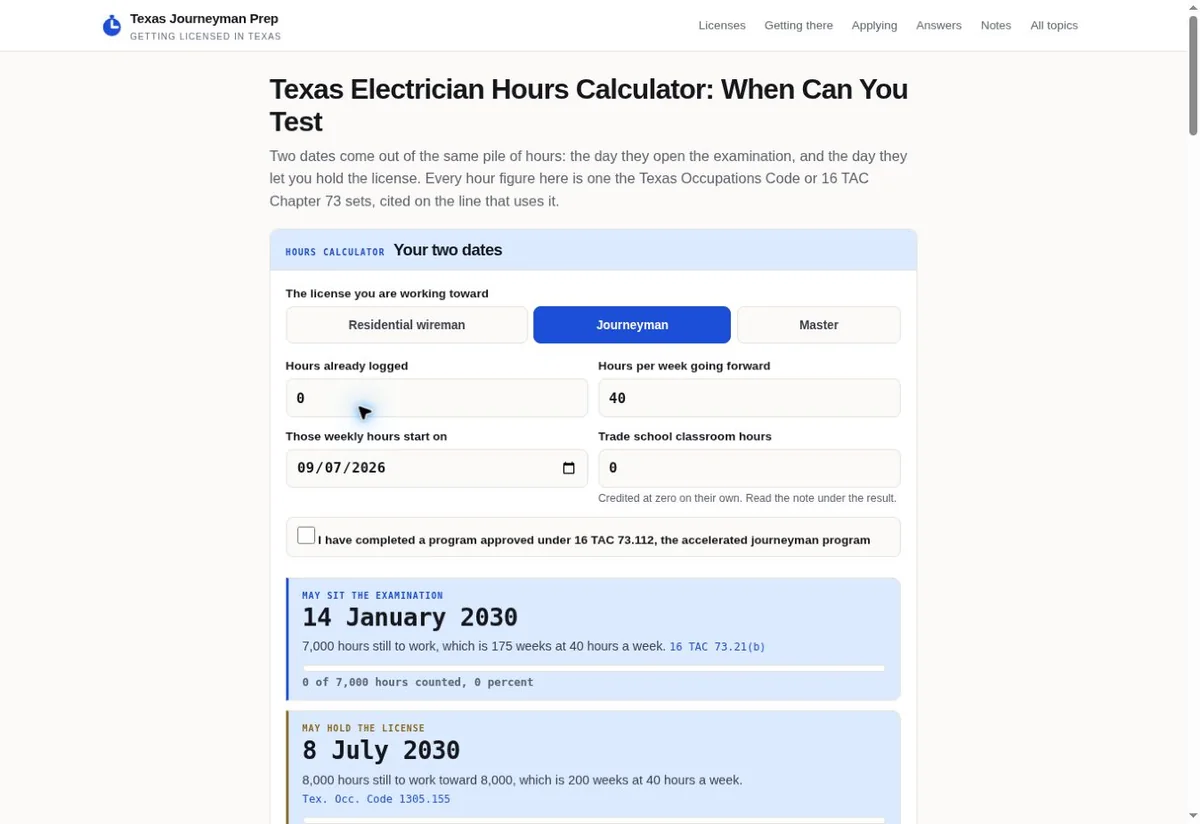
A calculator screen can show how labeled choices are presented, while your intake needs its own approval and tests. We use the reference to discuss layout rather than infer behavior.

Texas Journeyman Prep calculator with labeled fields
Specialist screen: Separate hour fields appear above the Texas calculator result. View the project
Hypothetical example A hypothetical Keystone Crossing advisory firm delays document exchange until staff provide instructions

Before

  • The firm's proposed consultation page has a broad text box and an optional upload button. No one has specified which receiver may inspect a document. A visitor could believe that a detailed submission is expected before the first conversation. This is a fictional design problem, without a real firm or customer.
  • The intake partner wants enough information to identify a suitable discussion topic. The partner also wants staff to provide document instructions after that first routing step. Those requirements should shape the prototype before the designer chooses the form controls or its completion message.

After

  • The revised proposal asks for a recognizable subject and an approved contact route. A short instruction explains which information should wait. We would ask the firm to approve that wording and test how the receiving contact interprets the marked request. Staff can then decide the appropriate next channel.
  • The website receipt confirms the action the system actually completed. It does not claim the firm accepted an engagement. The hypothetical form can be tested with harmless data before any real request enters it. A successful test would establish the observed path under those conditions, without creating a legal compliance claim.

Labeled planning fields appear in the pictured calculator from Texas Journeyman Prep. Its purpose differs from professional intake. We can discuss how visible choices and nearby explanations work together on that screen. Your firm still supplies its own subject labels and the process those selections must support.

A proposed intake prototype should identify which elements are visual and which rely on a connected account. A screen can show a button that has no receiving service behind it yet. We should state what the acceptance task must demonstrate before calling that part complete. The business and implementer can then evaluate the agreed behavior.

What can we learn from the reference without copying it?
Use it to discuss where a label sits and how choices are grouped. A form for an advisory firm needs different content and may need fewer inputs. We can prototype that task with approved sample wording. The firm's receiver should test the proposed result rather than assume that a pictured calculator proves the required intake behavior.
Can a polished screen stand in for a receiving test?
The screen shows presentation. Receipt must be checked through the actual proposed route. We would compare the visible message with the safe test record the staff member sees. That gives the firm a basis to accept the handoff, including any pending step that the design must explain.

Accept the intake work with the receiving professional present

The final intake check should involve the person who assigns the request. We can assess the form and its feedback against the safe test record that person actually receives.

Choose a marked request whose expected assignment the firm has already approved. Submit it through the proposed route and have the receiver explain what arrived. Compare the broad subject and contact details with the public form. We can identify a missing field or unclear status before that path receives real intake.

If the request passes to another system, include its owner in the check. An initial notification may contain a link whose permissions differ from the receiving record. We need to inspect that access as part of the agreed task. A screenshot of the notification does not establish that the intended person can open the record.

  1. Confirm the stage being accepted Describe the specific action the public page should complete. The firm may be accepting a contact request route while later document exchange stays outside the job. We can use that distinction to choose a test that reflects the actual work being commissioned.
  2. Follow the approved recipient path Ask the intended receiver to locate the marked test with the access their role permits. Check whether the subject and request status make sense without extra designer guidance. Our proposed handoff should fit the normal staff task, including any assignment the receiver must make.
  3. Try a correction before concluding Leave out one required input and follow the correction instructions. Then submit the revised test and inspect its record. We can compare both messages with the system behavior. The point is to understand a recoverable error as well as a straightforward successful path.
  4. Agree who maintains intake wording The firm should name the person who approves later subject or recipient changes. A content editor may need approval from that role before publishing an update. Our project discussion can establish whether ongoing changes require simple page editing or separate system work.
What information helps price this website task?
Bring the current consultation route and the accounts it touches. Tell us which receiver must use the result and which document stage should remain outside the public form. We can then discuss what the work needs to include. Project terms and timing depend on those requirements, rather than on a fixed promise attached to the district name.
Does the acceptance test guarantee future handling?
It establishes what was observed with the approved test and current configuration. Later changes can affect that path. We can help define which changes warrant another check, such as a new recipient or a replaced intake service. The firm remains responsible for its operating instructions and the permissions it grants.
What should we share on the first call?
Describe one intake question that the current page handles poorly, using no customer names or private records. Tell us which person can approve the public instruction. We can inspect the page together and identify the next fact needed to define the website work. A confidential case file is unnecessary for that starting conversation.
Can we check a request that has no attached file?
Yes, when the agreed first stage does not need one. Use a safe test that follows that path and ask the receiver what they can do with it. We want the page to make the next step clear with the least input the firm needs. If staff cannot assign that broad subject, they should name the missing detail. Our next draft can then explain that detail where the person is asked for it. Adding an upload button would not settle the unclear subject. The firm should first say what the receiver needs to learn. Then we can assess whether a field or a later staff question fits that need.

Sources

From the businesses we've worked with

“Jeff was the best social media manager and campaign manager strategist I ever had”
L. LaBeachIzzy's Empanadas · Jeff ran its marketing, 2018 to 2021

Marketing help for Indianapolis businesses

Based in Indianapolis, we serve businesses across central Indiana, including Carmel, Fishers, Zionsville, Westfield, Noblesville, Greenwood, Avon and Plainfield, and clients across the United States.

Request a free strategy call

Indianapolis, Indiana

Service area map

Explore Indianapolis on OpenStreetMapArea reference; this is not an office pin. Map © OpenStreetMap contributors.