Need help?Jamie

Market service plans

Brownsburg Website Design for Clear Service Booking

Your Brownsburg customers call to ask what a service includes, or how to reach you while a nearby road is closed, because your website doesn't say.

Trojan Digital Marketing designs websites for Brownsburg, Indiana service businesses, so customers see what each service includes and send booking requests that reach your staff. If people phone just to ask how to reach you, the site's missing something. During the 2022 roundabout closure at Green Street and Airport Road, a South Green Street shop told WTHR its business was down 55 to 60 percent.

Send the link to the page where customers book today and note any road work near your door. The first strategy call is free, and during business hours we aim to reply within five minutes.

  • Service pages that show scope before the form
  • A getting-here note ready for closures and detours
  • Booking requests that say who confirms and when

Trojan has more than 1,400 websites live today, so a Brownsburg booking site gets planned by a team with a long record of launches. Before you commit, you can open a few of those live sites and send a test through their request forms yourself.

Illustrative business planning tools.
IllustrationThis page drawn as a wireframeThe headline, highlights and button from this page, redrawn in desktop and phone layouts. It’s an illustration of page structure and isn’t a client site.PAGE WIREFRAMEtrojandigitalmarketing.com/brownsburg-w…Brownsburg WebsiteDesign for ClearService BookingService pages that show scope before the…A getting-here note ready for closures…Booking requests that say who confirms…Book a free strategy call010203BrownsburgWebsiteDesign forClear…Service pages…A getting-here…Booking…Book a free…

YOUR WORKING BRIEF

Choose where to start

Select the parts you want to discuss. Your choices carry into the inquiry form.

Discuss this service0 priorities selected

SEE HOW THE PIECES CONNECT

Explore the decisions
behind the plan.

THE TROJAN SYSTEMWEBSITE
A website built around the next customer decisionMESSAGE · EVIDENCE · ACTION
  1. A clear offer
  2. Evidence for the customer
  3. An action that works on mobile
A website built around the next customer decision

Trojan Digital Marketing offers Brownsburg website design for businesses that need a clearer connection between showing their work and receiving a useful service request. We build the experience around the choices customers make, the details staff needs and the character of the business. Original images and purposeful interaction can make the site distinctive, while practical navigation and forms keep the customer task clear. The scope includes the content and maintenance decisions that a visual mockup alone cannot resolve.

Questions about website design in Brownsburg, Indiana

How much does a new website cost for a Brownsburg service business?

A full build runs through the Marketing Startup Kit at $7,997, or three monthly payments of $2,799. The kit bundles a custom 15-page site with Google Business Profile optimization, twenty blog posts written for search and three months of consulting once it's live. If you only need a booking request form or new service pages on your current site, that smaller job is priced after the free strategy call.

How long does a Brownsburg website build take?

The Startup Kit's example schedule puts discovery in week one and the build in weeks two through four, including two rounds of formal revisions. Blog posts and your Google profile follow in weeks five to eight, then launch and consulting. Your own dates are set after the scope review, and how quickly your photos and service details arrive tends to matter most.

What should our site say when road work blocks the way to us?

Put a short, dated note at the top of the contact and booking pages with a route you've driven yourself. When Green Street and Airport Road closed for the 2022 roundabout, owners told WTHR the detour lacked signs and a usual five-minute trip took an extra 15 to 20 minutes. A note like that should come down the day the road reopens.

Should our form book a time or only request one?

Request one, unless your calendar really updates itself in real time. A confirmation message that says you'll call to confirm the time keeps a customer from showing up for an appointment staff never saw. When a request needs photos or a vehicle make, ask for them on a second step, so the first form stays short enough to finish on a phone.

Can our new Brownsburg site take payments?

Yes, and if you sell goods, Indiana's Department of Revenue requires you to register as a retail merchant through INBiz before you collect the 7% sales tax. The registration lasts two years, and each retail location displays its own. If you only sell services, check with your accountant before adding checkout, and we'll build the payment step once that's settled.

What if the new site doesn't bring more bookings?

Then the consulting months earn their keep. The Startup Kit includes weekly check-ins during month one and biweekly ones through month three, and that time goes to the pages where visitors open the booking form and quit. We also confirm requests land in an inbox someone reads, since a lost form and a slow month look identical from the outside.

Can we see websites you've built?

Yes. Trojan has more than 1,400 live websites, and you can ask for a few to try on your own phone. Our redesign of the Redefined Body skincare site showed shoppers they can buy the line in person at Georgetown Market in Indianapolis. Alexa Mahaber of Redefined Body wrote, 'I love the way it scrolls better,' and C. Teague McClendon of American Veteran Service Corp wrote, 'The board members and I are absolutely thrilled!'

Which Brownsburg road changes should a business website be ready for?

Website design for a Brownsburg, Indiana business needs a spot for closures and detours, because road work in town has cost local shops customers before.

The WTHR figure is one shop's own estimate from 2022. We last checked the town's closure listings on September 25, 2026, so confirm current dates with the town before posting a detour.

How does a booking website come together?

A Brownsburg, Indiana website design project in the Marketing Startup Kit follows an example schedule, from strategy in week one to launch and consulting after week nine.

  1. Sort services and booking rulesWe write down every service you offer and what staff need to know before they confirm a time.Week 1Together
  2. Design and build the pagesThe custom site is designed and built with weekly iterations and two formal revision rounds.Weeks 2 to 4Trojan
  3. Write content and set up the profileTwenty blog posts get written and your Google Business Profile gets optimized, while the contact page gains a spot for getting-here notes.Weeks 5 to 8Trojan
  4. Test every request pathTest bookings go through each form to the inbox your staff actually checks, on a phone and on a laptop.Before launchTogether
  5. Launch and adjustCheck-ins happen weekly at first, then every two weeks until month three ends, with changes aimed at pages where visitors leave.Week 9 onwardTogether

Make the service choices understandable

We start by asking which offers customers confuse and what information helps them choose. A list of package names may not explain the difference in scope. A useful comparison should show what each service includes, what requires discussion and which conditions affect suitability. We organize those details before designing an interactive selector. The interface should help a visitor understand the offer rather than create a recommendation from assumptions the business has never approved.

Ground the local experience in actual arrangements

Separate service coverage from an officeReal coverage · No invented office
Business
Start from the real business.
Coverage
Identify the places it actually serves.
Office
Do not turn a service area into an invented office.
Separate service coverage from an officeThis is a planning grid, not a ranking map. Publish only the areas the business actually serves.

Brownsburg's capital project resources identify Green Street and the Ronald Reagan corridor, while the town describes downtown commercial activity. Those settings inform an illustrative customer journey. The business still supplies its real visit or service arrangements. We do not infer current road conditions, a location or a customer relationship from those sources. Local detail belongs in the design when it helps someone use the actual service.

A proposed vehicle detailing website

Imagine an independent Brownsburg detailing business offering interior cleaning, exterior care and selected correction work. Its proposed site could introduce the work through original vehicle detail photographs, then provide a service comparison with plain descriptions. A selector might ask whether the customer is exploring interior, exterior or combined work and reveal the relevant preparation questions. It would not guarantee a finish or produce a binding quote without an approved basis.

Read more

The request form could ask about vehicle type, the service of interest and the condition the customer wants to discuss. Photographs might be requested later if the business prefers to review the inquiry first. The confirmation would explain the actual assessment and scheduling process. A customer looking for current appointment information would have a direct route. This proposed design is illustrative and makes no claim about an existing business, vehicle result or local booking performance.

Use imagery to explain the work honestly

Original photographs should show relevant detail and be accompanied by captions that explain what the business did. A comparison image needs an honest description of the conditions shown. We do not use unrelated imagery as evidence of a completed project. The layout can vary between a large photograph, a service comparison and a preparation sequence while retaining consistent spacing and typography. Important details remain readable text, so the customer does not need to enlarge an image to understand the service.

Define the request path before styling the form

Make the next step usableName1Email2Send inquiry3
1. Name
Move to the name field.
2. Email
Keep keyboard focus visible.
3. Send inquiry
Complete the action without a mouse.
Make the next step usableVisible focus and a logical control order help a person navigate without a mouse. Test the complete action.
  1. Identify the information staff needs for an initial assessment.
  2. Separate a request for review from a confirmed appointment or quote.
  3. Define the destination and staff responsibility for each request type.
  4. Write clear labels, validation messages and an accurate confirmation.
  5. Test the complete submission route using agreed sample information.

If online booking or a customer management system is included, its actual capabilities and account access are checked in scope. We make the integration requirements visible early so the business knows whether the proposal covers a working connection or a simpler inquiry workflow.

Add effects with a performance purpose

A selected service state, an image detail reveal or a process transition can make a page feel responsive. Effects should not delay access to the offer or depend on hover alone. We include reduced motion behavior and test touch and keyboard use. Images receive suitable dimensions, compressed formats and a considered loading order. Google's page experience guidance supports reviewing the overall experience. Our checks follow the specific service comparison and request tasks rather than promising a universal performance score.

Give staff a practical editing model

We identify what changes frequently, such as service descriptions, photographs, preparation notes and booking arrangements. An editable collection can support those updates where appropriate. Staff need guidance on image crops, field use and previewing a change. Existing URLs and useful content are accounted for during a migration. The design system should make it possible to add genuine work with consistent presentation, instead of encouraging the same generic photograph and summary to appear on every page.

Scope the customer task that needs improvement

Start with the decisionYour serviceFitTrustNext stepScopeEvidenceContact
Fit
Explain the service scope.
Trust
Show supporting evidence.
Next step
Give a clear contact route.
Start with the decisionOne service can lead to different questions about fit, evidence and the next step.

Share the current website and an example of the service choice customers struggle with. Trojan can define the content, design and implementation required to address it. Brownsburg SEO strategy covers page architecture, and Brownsburg Google Maps optimization can align public service and visit details. The Brownsburg market hub connects the full offering. A useful proposal should show what the visitor can do and how your staff will handle the resulting request.

Sources & further reading

YOUR NEXT MOVE

Make the next step count.

Let the customer describe the item before choosing a replacement

A spare-part screen needs enough item context for staff to begin. We design that first question so a customer can explain what they own without claiming a model they have yet to confirm.

  • Ask staff what customers reliably know about the item. A broad description may be more useful at the starting point than a code the person cannot find. We can use the receiver's answer to choose the first field. Its label should explain which item is being discussed before the page asks what replacement the customer wants.
  • Keep the owner's words distinct from any standardized product name. We can show the typed description as supplied while staff assess it. A suggested name needs a clear purpose if the interface offers one. Choosing that suggestion should not silently make it the confirmed identity of the customer's product.
  • Provide a way to say that the model is unknown. The shop decides which details help staff ask the next question. We can present that route without making the visitor fill a required code with a guess. The first enquiry should preserve the uncertainty staff need to see.
  • Ask whether the customer already has an order or earlier part enquiry. A maintained reference may help staff locate the context. We should use only the identifier the business approves for this first task. A public screen should not require a private purchase record just because the design has space for another input.

For a Brownsburg, Indiana shop, our starting point is the item question the receiving person finds hard to interpret. Bring the public route and explain what staff need to ask again after it arrives. We can prototype that gap with fictional item details. The business supplies its product knowledge and approval process; the screen carries the customer's description into that process.

Must the customer know the manufacturer's exact name?
The receiving team should decide what it needs for the first question. A person may recognize the use of the item while its label is missing or unclear. We can explain the available next step using your approved wording. The screen needs to let staff distinguish a known name from a description that still requires another question.
Should the first screen ask for every product detail?
Choose the details that help the receiver begin the enquiry. Later questions may need information the customer cannot supply at the start. We can discuss which fields are optional and which task requires each one. A long form that demands guessed values can make the record look complete while leaving the item identity unsettled.

Show that a model name is still the customer's description

A model field should preserve the status of the value supplied. We can make an uncertain name visible to staff and explain to the customer which identity question still needs checking.

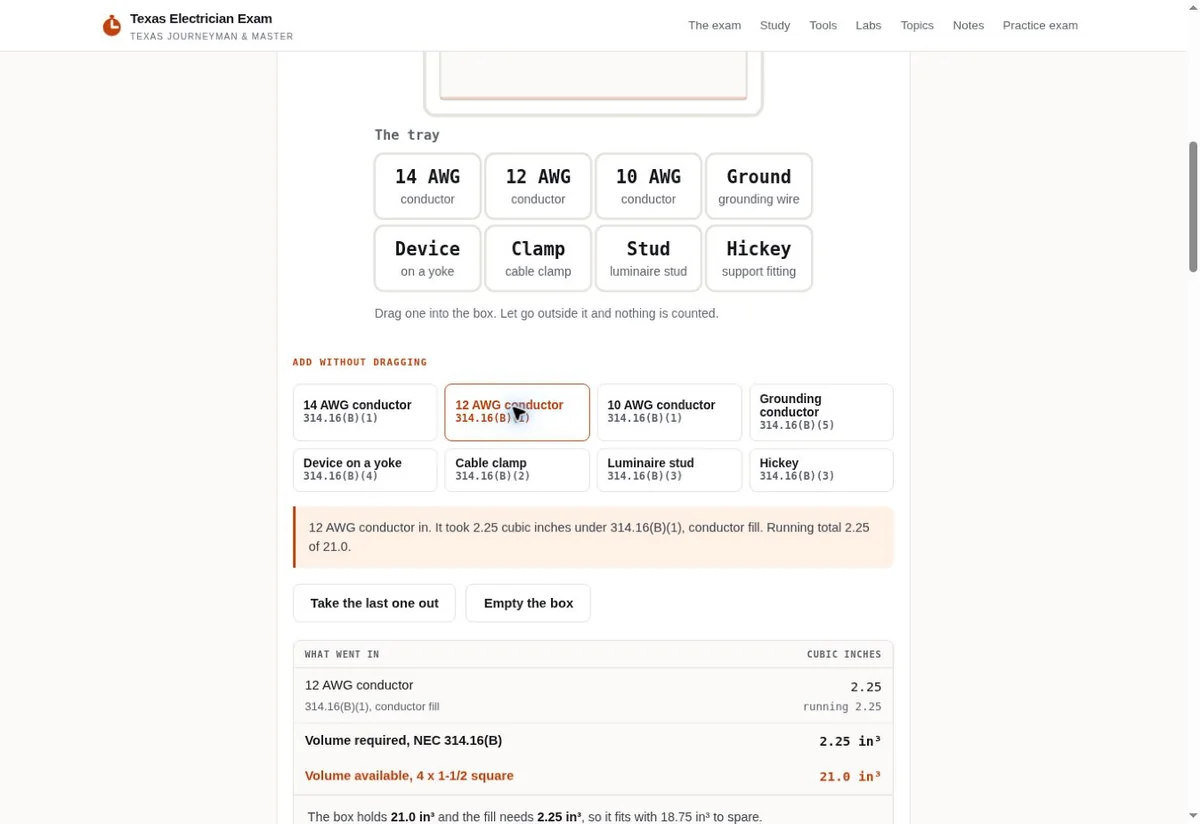
Texas Electrician Exam box fill calculator controls
The exam screen presents named controls alongside displayed information. View the project
Spare-part enquiry context
Item enquiry detailInformation the shop needsUncertainty the screen retains
Item descriptionThe receiver states which broad description helps identify the subject of the question. We ask for safe examples of wording customers may recognize.A marked request carries that description with its purpose intact. Staff should know which item the customer is trying to discuss.
Uncertain modelThe business decides how an unknown or tentative model can be supplied and which follow-up detail staff need.The staff view retains the uncertainty. Our screen should avoid replacing a tentative entry with a confirmed-looking product label.
Requested partStaff explain the terms they permit customers to use for a replacement question. The customer may be describing a symptom or visible piece.The selected term remains a requested item for assessment. The interface should not announce that staff have confirmed compatibility.
Enquiry stateThe shop defines the first action completed by the form and the staff step that follows. We need its approved receipt wording.Compare the visible message with the test record. Sending a question should preserve any unresolved identity and availability decisions.

Named components and a displayed result can be seen in the Texas Electrician Exam box-fill image placed here. We can discuss how a technical screen labels its controls. The pictured exam tool gives no identification evidence for a shop customer's item. Our spare-part proposal needs labels and status words approved by your receiving team.

Keep the tentative model near the rest of the item description when staff read the enquiry. We can use a safe test where the customer provides a name but marks it uncertain. The receiver should see that qualification beside the value. A separate note far down the record may be missed when someone starts from the product field.

Keep the requested replacement separate from a fit decision

The customer can name a part they want to discuss while fit remains unresolved. We preserve that request in the screen and leave compatibility decisions with the shop's authorized staff.

Can a product selector answer the fit question?
It can organize choices the business has approved for that purpose. We need the shop to explain what selecting one establishes. A list may only help route the enquiry. It should not claim that the chosen part fits an item whose identity remains uncertain. The staff member responsible for that decision supplies any verified product rules included in the proposed work.
What if the customer copies a part name from another website?
Let them explain the name they found and why they think it relates to their item. We can discuss a field for that reference if staff can use it. The enquiry should preserve it as customer-supplied context. A familiar name on another page does not provide the shop's answer about compatibility or stock.
Should the page show an immediate recommendation?
Only include an answer whose basis the business can substantiate and whose conditions are known. For an unresolved item, a clear staff question route may be the appropriate first action. We can prototype that task without inventing product rules. The screen should describe what remains for the receiver to check before any specific replacement is offered.
  1. Ask staff what the choice means The receiver explains whether the requested-part label helps assign the question or establishes a more specific fact. We use that meaning in the proposed screen. A selected value needs its purpose stated clearly before a customer acts on it.
  2. Try an uncertain item sample Use fictional wording with a tentative model and a requested part. We can ask the receiver to name the open questions from the test record. The sample should exercise uncertainty without representing a genuine repair or an actual product finding.
  3. Read the receipt against that status A sent-question message should describe the action actually completed. We ask the shop to approve wording about the next staff step. The visitor should be able to tell that the part question still awaits the business's assessment.

Carry the customer's reference into the enquiry staff actually read

Product context matters when it reaches the receiving person with its status intact. We follow the proposed record from the screen into the shop's approved destination before assessing the handoff.

Hypothetical example A fictional Brownsburg shop receives a spare-part question with a tentative model and an older image

Before

  • The invented customer types a model name they are unsure about and attaches a photo saved earlier. The proposed form shows a generic product label in its summary. Staff cannot tell that the name was tentative or whether the pictured item is the one currently owned. This teaching problem represents no real customer, image, product defect or part enquiry.

After

  • The revised proposal retains the supplied model with its uncertainty label. It asks an approved question about what the image depicts and keeps the customer's requested part visible as a request. We would submit a marked sample and ask the receiver to describe which facts remain open. The example establishes no compatibility, stock availability or successful repair.

An item reference can lose meaning when a form sends only its raw value. We can discuss a staff record that includes the relevant question label and the customer's chosen status. Ask the receiver what they need to see without opening several disconnected attachments. Their answer can guide the first screen while keeping the shop's technical assessment outside that initial website action.

A connected system may rename fields or summarize a value differently. We should inspect that destination when it belongs in the agreed work. The shop names the authorized account and the person who can approve the test. A correct-looking public form cannot show how its item context is stored or displayed to staff until the route is checked.

Use the starting input to discuss what a customer knows

A visible input screen can help frame the first enquiry question. We use the scanner reference for that discussion and ask your shop to supply the item language the visitor can understand.

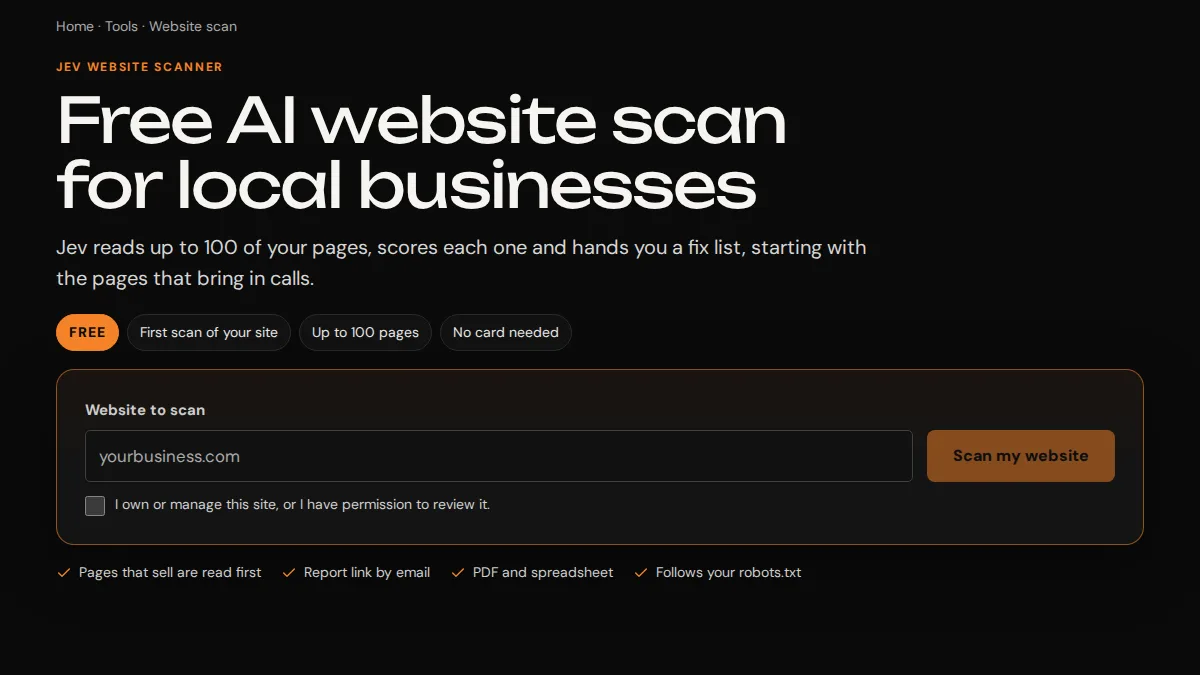
Jev scanner website input and scan action
A named input beside its starting action helps frame a spare-part question. View the project

A website input appears beside the starting action in the Jev scanner image. That visible pairing helps us discuss how to introduce the subject of a spare-part question. We can explain which item detail your shop wants beside the field that asks for it. The proposed label should also allow the customer to describe an item when its exact model remains uncertain.

A person may understand what an item does while being unsure of its official model. We can ask the receiver which plain description lets the conversation begin. The proposed screen can explain where the model appears using a public example the shop has approved. It should also retain an understandable option for a customer who cannot find that label.

  • Write the item question before designing its control. We should know what a customer is being asked to describe and why the receiver needs it. A dropdown is useful when the shop can maintain choices with a clear meaning.
  • Check the unsure choice with the staff member who handles it. Our prototype should explain the next question or contact action. A visitor who selects that state needs a route the business is prepared to receive.
  • Keep the visible explanation available during entry. We can inspect the field after a safe sample is typed and edited. The person should still recognize whether they are entering a confirmed code or a tentative description.
  • Use a keyboard task to follow the proposed screen through correction and sending. We can ask the implementer how focus reaches a changed field. The screenshot offers layout context, while the planned interface needs its own interaction check.

Test a corrected reference without announcing that a part is available

A customer may revise an uncertain item description before staff answer. We test that proposed correction path and preserve the difference between a changed reference and the shop's later product decision.

  1. Mark the first description Choose a fictional model value the shop approves for testing and label it tentative. We can follow the proposed enquiry to the receiver. Ask which identity facts remain unsettled and whether the requested part is still recognizable as the customer's question.
  2. Change the permitted reference The planned interface should explain whether these changes affect an unsent draft or require a question about an earlier staff record. We need the shop's process for the latter case. A correction button should not hide whether a new message was created.
  3. Inspect what staff see next Ask the receiver to locate the corrected sample and explain its relationship to the earlier version. We should check that the current supplied reference is visible with its status. The business decides how its system retains or reconciles earlier enquiries.
  4. Compare the visible completion wording A correction receipt should describe the action observed in the test. We can avoid language that suggests staff have confirmed a part merely because the model field changed. Compatibility and current availability still require the shop's approved assessment.
Can changing the model automatically reserve a part?
Only the shop's actual approved process could establish a reservation. The website task discussed here preserves a question for staff. We should ask what any connected product system can substantiate before its behavior enters the scope. A correction to the customer's description supplies context; it cannot itself confirm the item they need.
What should we do when the two descriptions disagree?
Make that conflict understandable to the receiver and ask the business how it should be handled. We can inspect whether the proposed screen preserves both the latest reference and the fact that an earlier one existed. Staff decide which information they need next. The interface should leave that question open until their process resolves it.

Explain what an uploaded image depicts before using it as context

A product photo can add context while leaving identity uncertain. We ask the shop which image question belongs in the enquiry and how staff should receive the permitted sample.

Should the form require a photo?
The receiver should explain whether a photo is needed for the first question and what it can show. We can discuss a route for someone who has no suitable image. A required attachment may make the enquiry harder without settling product identity. The shop chooses the permitted file route and the later checks its staff perform.
What can the customer say about an older image?
Ask whether it depicts the item currently being discussed or only a possible reference. We can provide the wording staff approve for that distinction. The receiver needs to know the image's stated context before drawing any conclusion. The screen should keep that description attached when the file reaches the staff destination.
Can we use a real customer image in the prototype?
Use a safe sample authorized for the design task. A fictional reference can exercise the layout without bringing a customer's private material into it. We should state why the sample is shown. The shop provides any actual product evidence later used publicly and approves what that evidence establishes.

The Indiana place file identifies Brownsburg with town status in Hendricks County. We use that local name to distinguish the service-page context. It gives no basis for an item diagnosis or a shop's part stock. Those facts belong with the actual business. Our first design call can use public task wording and a harmless test image approved for the proposed route.

Keep the enquiry focused on what the receiver needs at its first stage. We can inspect the image instruction and ask whether it creates a clear customer action. If staff still need to see the item, explain their approved next question. A picture should remain context for that discussion rather than gain an unsupported product conclusion through the screen's presentation.

Agree the first screen around the uncertainty staff need to retain

Start with a spare-part question your current route handles poorly. We can define the product context, status wording and receiving check needed for a proposed improvement.

What should the shop bring to Trojan?
Bring the public enquiry screen and explain one item-identification question staff have to ask again. Tell us which person approves the product labels. We can use invented sample wording to discuss the screen. The starting conversation does not need private orders or a product compatibility claim that the business has yet to check.
Which details determine the project price?
We need to know the fields involved and the staff destination the screen must reach. A content correction differs from a new upload or record-update connection. Our scope discussion can identify those parts with their authorized owners. We discuss price and timing once the shop has defined that work and its required approvals.
How can we judge the prototype before real enquiries arrive?
Use an uncertain-model sample and its proposed correction. Ask the receiver to explain what the customer supplied and what remains for staff. We can compare that meaning with the public receipt. The task checks the website route under the test conditions, while part availability and later customer outcomes require their own business evidence.

We can discuss this first spare-part screen on the free strategy call. Describe the item question and the point where your current page makes a guess look confirmed. Our Brownsburg website discussion can then focus on the label and staff route that preserve that uncertainty. The shop remains responsible for the product answer it later gives the customer.

Sources

From the businesses we've worked with

“I love the way it scrolls better. Thank you so much, Jeff.”
Alexa MahaberRedefined Body skincare

KNOW YOUR NEXT STEP

Let’s talk about
Brownsburg.

Based in Indianapolis, we serve businesses across central Indiana, including Carmel, Fishers, Zionsville, Westfield, Noblesville, Greenwood, Avon and Plainfield, and clients across the United States.

Talk with Trojan

Brownsburg, Indiana

Service area map

Explore Brownsburg on OpenStreetMapArea reference; this is not an office pin. Map © OpenStreetMap contributors.