Need help?Jamie

Market service plans

Park 100 Website Design for Suppliers That Want Better RFQs

Your website still reads like a brochure from years ago, and buyers call to ask whether you handle work the site never mentions.

Trojan Digital Marketing designs websites for industrial suppliers in Park 100, on Indianapolis's northwest side. Your capabilities get pages with specs and approved photos. The RFQ form can take drawings, so a buyer can check fit and ask for a price in one visit. It's for owners who keep hearing, "We couldn't tell from your site whether you do this." Marion County draws in more workers than it sends out, so job applicants will find your site too.

Send the form with a link to your website and the RFQ that frustrated your estimator most this year. The first strategy call is free, and during business hours we aim to reply within five minutes.

  • Capability pages a buyer can compare at a glance
  • RFQ forms that take the files your estimator opens
  • Backed by more than 1,400 live websites we've built

Jeff Clerisier started doing web work in 2016. On a Park 100 site, we test what decides whether an RFQ arrives, like an upload that takes a large drawing and a form that works on a phone.

Illustrative business planning tools.
IllustrationThis page drawn as a wireframeThe headline, highlights and button from this page, redrawn in desktop and phone layouts. It’s an illustration of page structure and isn’t a client site.PAGE WIREFRAMEtrojandigitalmarketing.com/indianapolis…Park 100 WebsiteDesign for SuppliersThat Want Better RFQsCapability pages a buyer can compare at…RFQ forms that take the files your…Backed by more than 1,400 live websites…Book a free website strategy…010203Park 100WebsiteDesign forSuppliers…Capability…RFQ forms that…Backed by more…Book a free…

YOUR WORKING BRIEF

Choose where to start

Select the parts you want to discuss. Your choices carry into the inquiry form.

Discuss this service0 priorities selected

See how I'd approach this

Choose a question
to look at with me.

A website built around the next customer decisionMESSAGE · EVIDENCE · ACTION
  1. A clear offer
  2. Evidence for the customer
  3. An action that works on mobile
A website built around the next customer decision

We design a Park 100 supplier's site around one test: can an engineer tell from a single page whether you can make or service their part? If not, we'd fix that page before touching colors or animation, then build the quote form around the fields your estimator reads first.

Link Logistics: Park 100 Industrial Center 13: Link Logistics lists industrial property at Park 100 in the Northwest Indianapolis market, including distinct office and industrial space. That listing shapes only the visit section of your site. Everything else follows your capabilities and the order in which your team reviews a quote.

Questions about website design in Park 100, Indianapolis, Indiana

What will a Park 100 industrial website cost?

A custom industrial site is priced after the free strategy call. The number depends on how many capabilities need their own page and whether the RFQ form must accept drawings. If you're launching a new company, the Marketing Startup Kit costs $7,997 or three monthly payments of $2,799 and covers a custom 15-page site plus profile optimization, twenty blog posts and three months of consulting.

Can the RFQ form accept drawings and spec sheets?

Yes, as long as your team is ready to receive them and knows where they go. We agree on allowed file types, the size limit and the inbox that gets each upload before we build the form. Some shops prefer a short first form and ask for full drawings once the estimator replies, which also keeps confidential files off a public page until you're ready.

Should our site explain how to find us inside Park 100?

Yes, if anyone visits, since business parks are easy to get lost in. Link Logistics lists Park 100 buildings with separate office and industrial space, and when a building splits that way, visitors and carriers need different doors. A short visit section naming the entrance for meetings and the dock for deliveries, with a photo of each, keeps first-time drivers from circling the building.

How long does a new industrial website take?

For a new business on the Startup Kit, the published twelve-week plan puts the build in weeks two to four and the launch in weeks nine to twelve. An established supplier's rebuild runs on its own clock. It depends on how many capability pages you need and how quickly your team signs off on specs and photos.

Can we show the shop floor without exposing customer work?

Yes, and you decide what's shown. Before anyone photographs the floor, agree on a shot list of your own equipment and finished parts you're free to show, and keep anything with a customer's logo or drawing out of frame. We then caption each photo with what it proves, like the largest part your press can handle, so it earns its space on the page.

What if RFQs don't improve after launch?

Then the form data shows it, because every request records the page it started on, and we rework the weakest page first. When requests are plentiful but poorly matched, the fix usually sits on the form, like a required field for material or quantity. New businesses on the Startup Kit get three months of consulting after launch, which covers this kind of tuning.

“…drove a noticeable uptick in leads within just a few weeks…”
Mike BamosiGoogle review
“I had a great experience working with Jeff…”
Heather DoanGoogle review

Jeff Clerisier founded Trojan Digital Marketing in March 2018.

We have more than 1,400 live websites.

We’re based in Indianapolis, where the city and Marion County share one government, Unigov.

We also work with clients across the United States.

Read our Google reviews

Which Indianapolis facts shape a Park 100 website?

These sourced facts about Indianapolis, Indiana shape who a Park 100 industrial website has to serve besides buyers, from shift applicants to first-time visitors arriving by car.

Both facts describe Indianapolis or Marion County as a whole, and neither one is a client of ours or a Park 100 tenant.

Who visits a Park 100 industrial website, and what do they need?

Website design for a Park 100 company in Indianapolis, Indiana plans a separate path for each kind of visitor, shown here for a hypothetical distributor with a front office and a dock.

Who's on the siteWhat they came to findWhere the design puts it
A buyer comparing suppliers
Whether you handle their part, material or volume
Capability pages with specs and approved photos
An engineer holding a drawing
A way to send files and a name who will reply
An RFQ form with uploads and your stated reply window
A carrier or first-time visitor
Which door or dock to use
A visit section with entrance photos and dock hours
A job applicant
Shifts and how to apply
A careers page kept apart from the RFQ form
A purchasing team vetting vendors
Tax and insurance paperwork before a first order
A vendor information page linked from the footer

What should a Park 100 company gather before design starts?

A Park 100 website in Indianapolis, Indiana needs facts only your team can approve, while we design the pages, forms and handoffs around them.

  • A current line card or capability list, with anything you've stopped offering crossed out
  • Approved photos of equipment and finished parts, with customer marks removed
  • The file types and sizes your estimator can actually open
  • Who receives RFQs, job applications and carrier questions
  • Two RFQs you were glad to get and two you declined
  • A page plan with one page for each capability you quote
  • An RFQ form that asks for your estimator's must-have details first
  • Separate routes for buyers, carriers and applicants
  • Tracking that records which page each request started on

Let the capability lead the visual story

An industrial site should help a buyer recognize the work the company actually performs. We begin with approved facility, equipment, process, and project images, then decide which details need explanation. A strong photograph can introduce a capability, while an annotated sequence can show the stages of the work without exposing sensitive information.

The visual design avoids turning every service into an identical icon card. It uses scale, composition, and clear captions to make different capabilities recognizable. The business approves what can be shown and what the imagery establishes, particularly when a photographed machine or project belongs to another organization.

Design a capability chooser with an honest result

A short selector can guide a buyer toward a relevant service when the rules are clear. It might distinguish application type, broad material category, or the stage of the project. The result should identify the next useful page or review route, rather than declare that the business has accepted the work.

We prototype the choices with your technical team and test cases that do not fit. An unsupported request needs an understandable response and, where appropriate, a contact alternative. The tool should reduce uncertainty about navigation while leaving technical suitability and commercial commitments with the people qualified to decide them.

Prototype a proposed equipment service request

Suppose a hypothetical service company receives equipment inquiries without enough information to route them. We would design an initial form that asks for the equipment category, broad concern, operating location where relevant, and a contact. An optional reference image can help when the business can receive it through an approved route.

The receipt explains that the request has been received for review. It does not diagnose a fault, confirm a technician visit, or quote a repair. The staff notification retains the page and selected service context so the receiving person can begin the appropriate conversation without reconstructing the visitor’s path.

Keep technical documents connected to the offer

Give useful pages a path from the siteHomeServiceGuideProject proofNext question
Home → service
Link the service to project proof.
Home → guide
Link the guide to the next useful question.
Give useful pages a path from the siteDescriptive internal links connect a discoverable page to supporting details and a next step.

A document library can be designed around the decisions buyers make. Each download should identify its subject, relevant version or date, and purpose. A readable page introduction helps the visitor decide whether they need the full file. We also assess how document links behave on mobile and how staff update them.

The website should distinguish public product information from material that belongs in a later controlled exchange. The client defines those boundaries. A convenient upload field does not automatically make a system suitable for every technical or commercial document a buyer may want to send.

Treat reliability as part of the design brief

We prepare responsive images, stable layouts, readable tables, and interactions that remain usable with keyboard input and reduced motion. Technical detail should not require a large animation or video to load before the buyer can identify the relevant capability.

Google’s Core Web Vitals documentation separates loading, responsiveness, and layout stability. We use those concerns in testing representative capability and request pages. The acceptance report also checks document access, form errors, and the staff handoff, because a fast page with a broken inquiry route still fails its practical purpose.

Hand over a maintainable industrial content system

The proposed build can include a capability template, project evidence layout, document index, inquiry forms, and an editorial workflow. Your team supplies approved facts and assigns the people who review technical content and incoming requests. The handover demonstrates how to update a capability or retire a document without leaving contradictory information behind.

Review the completed site through real tasks: identify whether an application fits, locate a current document, and send a labeled test inquiry. Later measurement can examine useful requests and the context they contain. The design is scoped around those functions without promising a quotation count or contract value.

Put the first scope in order

  1. Approve the capabilities and technical images suitable for public presentation.
  2. Prototype application choices, document access, and the initial request workflow.
  3. Test unsupported selections and confirm the inquiry reaches the technical review team.

Compare Park 100 planning, the Indianapolis directory and website design.

Let’s review whether an engineer can assess your Park 100 capabilities before submitting specifications.

Sources & further reading

Talk with Trojan Digital Marketing

Give a document a name the receiving team can recognize

A supplier document needs a stable identity before it enters a website library. We can build the page around the product and revision names your technical owner approves.

  • Name the subject in terms a buyer can match to the work. A file called overview does little when several product families have one. We should ask your technical owner which product name is public and which code belongs only in a later exchange. The website label should use that approved name, with enough context to distinguish it from a nearby document.
  • Choose a revision label that the business already understands. We should not invent a numbering scheme merely to make the library appear orderly. Ask whether a letter refers to a product change or a corrected drawing. That answer affects the wording beside the download. A newer upload date alone cannot explain which technical facts have changed.
  • Identify who may approve the file for release. That person may differ from the editor who uploads it. Our design discussion should establish how the editor recognizes an authorized replacement. A file in an email thread does not explain its intended public use. The business supplies the approval and tells us whether the exact attachment is ready to publish.
  • Decide which reference survives if the filename changes. The product page may retain a steady document code while the downloadable file uses a new revision. We can ask the staff member to find that code in a sample request. A buyer's reference should lead to an identifiable document rather than force the recipient to guess from a vague attachment name.

A Park 100 supplier may have purchasing staff and technical contacts reading the same file for different reasons. The identity should work for both. We can discuss a short document title beside the download and a fuller explanation on its page. Your owner confirms which details establish the subject and which details require a direct technical conversation.

Start with one public file that your team is willing to discuss. We can inspect how its name appears on the page and inside the document. That comparison can reveal a missing revision before a larger library is planned. It does not require customer drawings or a list of private specifications. The first website conversation can use approved public material.

Explain what a buyer should do with an older copy

A buyer may return with a file saved before your update. We should make the old reference understandable and tell them how to ask about its current use.

Texas Journeyman Prep homepage with two choices
Revision choice: Texas homepage shows distinct visitor task choices. View the project
Should the old file remain available?
That depends on the reason for replacement. A technical owner may want it withdrawn or may permit a clearly labeled historical copy. We should ask which treatment is authorized before designing the link. A website editor cannot declare an earlier specification safe to use. The public explanation should tell the buyer which current page to consult and how to raise a question about the older reference.
Can a revision badge explain the change?
A badge can identify a version, but it needs words that explain its purpose. Current may mean approved for public use today, rather than applicable to every order. We can ask the owner for the exact status wording. If a change affects only one product variant, the page should say so. An attractive new label cannot replace that product context.
What if a buyer quotes an earlier revision?
Keep a way for the staff member to identify the reference in the request. We can discuss a document code field or a short question about the file being used. The business decides which details are enough to locate it. Staff should then handle the technical question through their actual process. The form receipt should acknowledge the inquiry without stating that the earlier specification is accepted.
Does the pictured homepage prove revision handling?
Separate task choices appear on the pictured Texas Journeyman Prep homepage. We can use that visible separation to discuss how a current document path and an older-reference question might differ. The pictured site is an education project, with its own tasks. Your supplier library needs its own labels and receiving process. The image alone supplies no record of how a document replacement would work.

Use a sample older filename in the design discussion. Ask a staff member to explain what it refers to without opening a private archive during the call. Our page wording should preserve the meaningful reference while directing the buyer to the approved next action. If nobody can recognize the name, changing its visual style will leave the underlying problem in place.

A buyer needs to distinguish the current download from instructions about a former one. We can check that distinction on a phone as well as a larger screen. Long version labels can wrap badly beside a small download button. The page needs enough room for the status words to remain attached to the correct file.

  • Use the precise revision expression approved by the technical owner. We can ask whether an ordinary buyer would understand it and whether a short explanation is needed. The public status should describe the document's intended use rather than imply a certification or legal clearance.
  • Keep a replacement link close to the older reference when the business authorizes that treatment. We should check that the destination identifies the product variant. Sending every old file to a general homepage leaves the buyer to reconstruct which item changed.
  • Ask the receiving team what it needs when an earlier copy is cited. Our form discussion should follow that answer. A historical reference can help staff begin a question without making the public website responsible for deciding technical suitability.

Keep the explanation with the downloadable material

A saved file can travel beyond its original page. We can design the public context so a later reader can identify the subject and find the right question route.

Technical-document release register
Question or recordBusiness inputAcceptance check
Current revisionThe document owner supplies the approved product name and revision expression, plus the exact file released for public use.We match the page label to the file's own identity and check that the download reaches that release.
Legacy referenceThe technical owner states whether a previous reference may be shown and what a buyer should do when using it.An older-link task reaches that instruction without suggesting that staff have accepted the earlier specification.
Context pageYour team supplies the variant limits and a public explanation of what the document covers.A reader can find the relevant context from the file reference and tell which product question the page addresses.
Request attachmentThe receiving team states whether to ask for a document code or accept a file through an authorized route.A marked test retains the stated reference in the destination the staff member actually checks.

A context page can explain why someone would need the file before they download it. We can ask your team to describe the task in plain terms. A dimensional sheet and an installation guide serve different questions even when they share a product name. The page should make that difference clear without adding technical advice the supplier has not approved.

Ask what happens when a colleague forwards the file alone. The supplier may choose to include its approved public page address inside the document. We can discuss that connection with the person responsible for the file. A website change cannot alter copies already stored elsewhere, so the next action should remain intelligible when a buyer brings an older attachment to staff.

How much document detail belongs in the page introduction?
Enough to help the reader choose the relevant file and understand its intended purpose. We can ask the technical owner which variant or revision distinction matters before download. The page should not restate an entire specification in condensed words that could alter its meaning. When a detail needs the exact document language, point the buyer to that approved file and its owner-defined question route.
What does a download click tell us?
It indicates an interaction with the link when that interaction is measured correctly. It does not establish which colleague later used the file or whether an order followed. We can discuss the available measurement as a separate website task. Document acceptance still concerns the identity and destination observed in the test, with technical use left to the business.

Let staff recognize the file behind a technical question

A document reference helps only when it reaches the person handling the question. We should follow your receiving process before choosing how the website asks for that reference.

Hypothetical example A hypothetical Park 100 supplier replaces a product document while preserving the older reference.

Before

  • An unnamed supplier publishes a revised sheet. A purchasing contact still has an earlier copy and sends a question using its code. The website offers only a general message field, so the contact writes a loose description of the product. Staff cannot tell which revision prompted the question without another exchange. This example describes a possible design problem, with no real customer or transaction implied.

After

  • For this teaching exercise, the supplier approves a page that identifies the current sheet and a route for questions about former references. The first question asks for the code shown on the buyer's copy. Staff use that reference to locate the item through their existing process. We would check a marked request against the receiving screen before calling the website route ready to assess. The exercise supplies no measured sales or technical result.
  1. Ask which reference staff use Have the receiving person name the smallest public identifier that helps locate the document. We should use their actual language in the form. The label may need a nearby example showing where the code appears. Keep the example free of customer drawings and private order details.
  2. Choose the permitted first exchange Your team decides whether a code is enough or an attachment is appropriate. We can discuss the file types and receiving destination if an upload enters the proposed work. An upload button should not appear before the business has named how its staff will handle the material.
  3. Follow a marked sample into the destination Use a safe test reference approved for this check. Ask the recipient to find it and identify the revision being discussed. Our check concerns whether the website preserved the supplied context. It does not confirm that the supplier has accepted the requested work or endorsed the document's use.
  4. Read the visitor receipt against staff status The confirmation text should say what has actually happened. If the form has sent a question for staff attention, say that. We should avoid language that implies a quote is underway when the technical owner has not read the reference. The business supplies any later response expectation it wants made public.

Some buyers will use an internal description rather than the supplier's code. Give them a reasonable route when they cannot find the identifier. We can discuss an optional note that explains the file's subject. Staff still decide whether that note is enough to continue. The design should avoid trapping the buyer in a required field whose answer they do not possess.

Keep the public request separate from your technical archive permissions. A reference can guide a question without giving the requester access to every related file. Our conversation should establish the website's task and the staff action that follows it. Any change to the document system itself needs its own agreed requirements and authorized access.

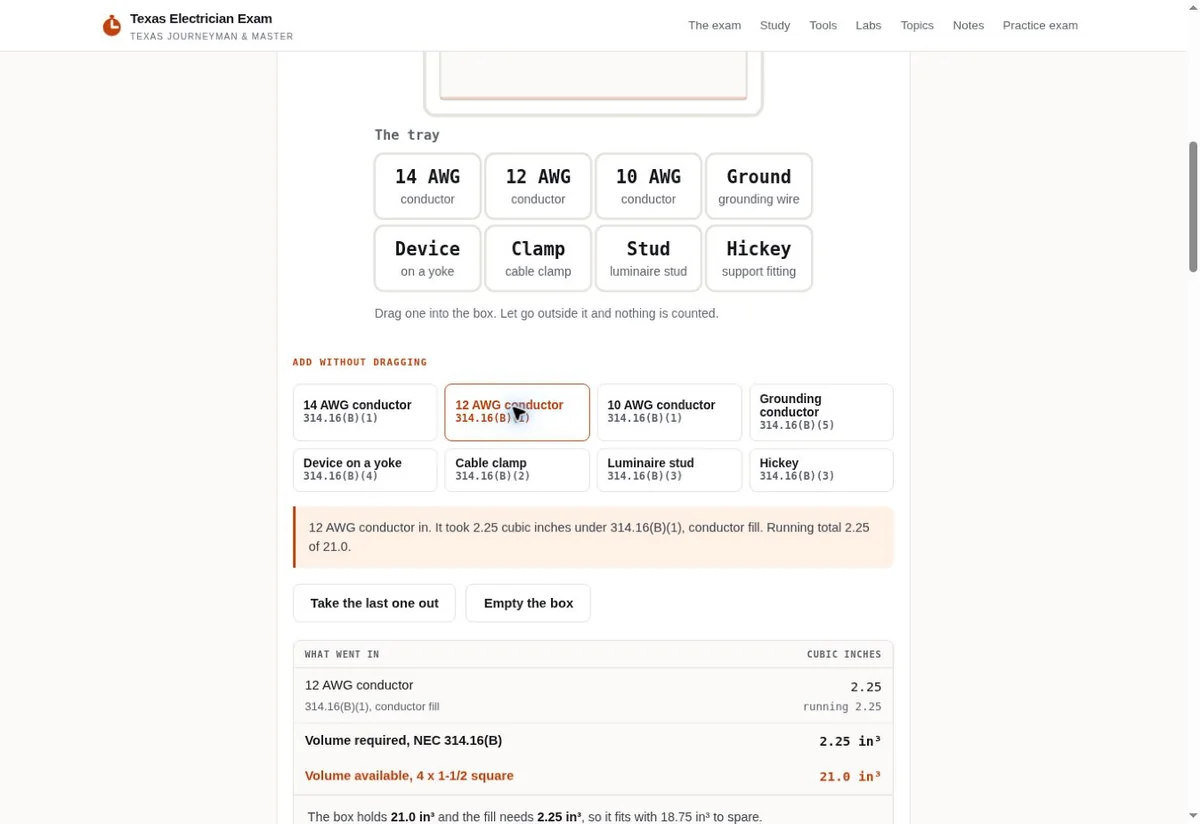
Use the exam tool to discuss labels and displayed output

A real interface can make a design conversation more concrete. We can examine the pictured exam tool while keeping its task separate from supplier document handling.

Texas Electrician Exam box fill calculator controls
Interface reference: Exam lab displays controls and calculation output. View the project
  1. Identify the visible controls The Texas Electrician Exam box fill screen has controls and a displayed calculation area. We can discuss how the screen places inputs near their result. Your product question may need different fields. The screenshot helps point to a layout choice; it does not define which engineering information your business should collect.
  2. Write the supplier field in its own terms Ask your technical owner for a plain label and a permitted example. We should test whether a buyer can match that label to the document they hold. Avoid copying an exam-tool term into a supplier form simply because the visual treatment fits.
  3. Explain what follows the action A calculation screen displays an output, while a document question may go to a staff member. Our button and receipt text should describe the actual next action. If a person must check the reference, the interface should not present the form submission as a technical answer.
  4. Try an incomplete reference Choose a safe sample with a missing revision character. We can observe whether the page gives a clear correction or permits a question without that detail. The business decides which route makes sense. The test should keep the supplied product context when the visitor returns to correct the field.
Can the image establish that our planned form works?
A picture shows the visible arrangement at capture time. Our supplier form needs a direct task check once it exists. We should inspect its labels and confirm that the receiving person can find the test reference. A layout discussion is an earlier step, with a different purpose from testing the complete route.
What if the document code is long?
Make space for the reference your team actually uses and check the field with a representative public sample. We can look at how it wraps in a receipt and whether staff see the entire value. Shortening the field for visual neatness can hide the characters that distinguish one revision from another.
What should we bring to a first design discussion?
Bring a public document and the page that links to it. Explain one revision problem that your team wants the website to address. We can inspect that narrow task without asking for a private product archive. The receiving person and technical approver should be identified before a broader library or upload route is priced.

Check where the old reference remains before withdrawing it

A replacement file can leave stale links on pages the business still controls. We can discuss a retirement task that identifies those references and their next authorized destination.

  • Inspect the product page and any business-owned document index that points to the former file. We should compare each label with the owner's replacement instruction. One corrected download button does not establish that every reference has changed. The editor needs to know which pages were included in the agreed website task.
  • Check a direct link to the old address when the owner authorizes the test. Its destination should fit the retirement instruction. We can discuss a notice that identifies the former subject and points to the current context. A visitor should not be sent to an unrelated product merely because it has an available page.
  • Ask which externally shared copies the business knows about. Our website work cannot recall an attachment saved by another company. It can make the current public explanation clear and identify which old reference the staff member should recognize. Your team handles any direct communication it chooses to send to known recipients.
  • Name the editor and technical approver for the next change. We can ask how an approved replacement reaches the editor and how that editor recognizes its intended public use. The task should have a practical owner even when the first release involves only one file. A larger document library can follow once that responsibility is clear.
How should we judge the first release?
Use a current-file task and an older-reference task. A person should find the right document identity, then understand where to raise a question about the previous copy. We can compare the observed paths with the supplier's approved instructions. That is a concrete website check even when no later inquiry or order is available to measure.
Can Trojan Digital Marketing quote the library from its file count alone?
A file count leaves out revision relationships and the way staff receive questions. We need to see a public sample and understand the intended maintenance task. The work may involve an index edit or a different form route. Our discussion can establish those requirements before project terms and timing are agreed.
What if the technical owner has not approved the replacement?
Keep that approval gap visible in the planning conversation. We can work on the page structure using permitted sample wording, but the business still supplies the released content. A website draft should not make an unapproved file appear current. The owner needs to state which public material may be used before the replacement is treated as ready.

Sources

From the businesses we've worked with

“They are amazing. Working with them makes life so easy when it comes to SEO and web design”
George B.Google review

Marketing help for Indianapolis businesses

Based in Indianapolis, we serve central Indiana and clients across the United States.

Request a free strategy call

Indianapolis, Indiana

Service area map

Explore Indianapolis on OpenStreetMapArea reference; this is not an office pin. Map © OpenStreetMap contributors.